splitforms.com

HTML · ATTRIBUTE

HTML spellcheck Attribute: Turn Spell Check On or Off

Last reviewed

spellcheck is an enumerated attribute ("true" or "false", not a boolean) that tells the browser whether to underline misspelled words in a textarea, text input or contenteditable. It is inherited from parent elements like <form>, affects only the browser's user interface, and is never submitted with the form data.

  • Live, editable example
  • Copy-paste snippet
  • Attributes & common mistakes
Live demo · nothing is sent

What gets submitted

Fill in the form above and press its button. The demo stops the request and lists every name=value pair the browser would send, plus the controls it leaves out.

With a free access key in the form, these fields land in your splitforms dashboard; access_key and botcheck are read by splitforms, not stored as lead data.

Edit the HTML and re-run it
Runs in a sandbox. Nothing is sent.

Minimal snippet

spellcheck-example.html
<textarea name="message" spellcheck="true"></textarea>

Copy-paste code

HTML spellcheck Attribute code you can paste today.

Replace YOUR_ACCESS_KEY with a key from your free splitforms dashboard. The form posts to one endpoint — submissions land in your inbox and dashboard with spam filtering built in.

Get free access key
spellcheck.html
<form action="https://splitforms.com/api/submit" method="POST">
  <input type="hidden" name="access_key" value="YOUR_ACCESS_KEY">

  <label for="username">Username</label>
  <input type="text" id="username" name="username" spellcheck="false" autocapitalize="off" autocomplete="username" required>

  <label for="message">Message</label>
  <textarea id="message" name="message" rows="4" spellcheck="true" required></textarea>

  <!-- Honeypot: hidden from people, bots fill it in -->
  <input type="checkbox" name="botcheck" style="display:none" tabindex="-1" autocomplete="off">

  <button type="submit">Send</button>
</form>

Attributes · spellcheck

Which attributes go with spellcheck?

spellcheck toggles squiggly underlines. These attributes work alongside it to control input behavior.

HTML spellcheck Attribute attributes and what each one does
AttributeWhat it doesDocs
spellcheck="true"Explicitly enables browser spell checking and red squiggly underlines on the field.MDN
spellcheck="false"Disables browser spell checking on this element and overrides any inherited value from parent elements.MDN
spellcheck=""The empty string acts as true. A bare spellcheck attribute with no value also defaults to true.MDN
autocorrectSafari and iOS non-standard attribute. Use autocorrect="off" to prevent Apple devices from autocorrecting text.MDN
autocapitalizeControls automatic capitalization on mobile keyboards (such as off, none, sentences, words, or characters).MDN

Common mistakes

spellcheck mistakes to avoid

Most problems come from treating spellcheck as a boolean or leaving it active on non-dictionary fields.

  1. spellcheck is not a boolean attribute

    spellcheck is an enumerated attribute with the valid values "true" and "false". Unlike boolean attributes, writing a bare spellcheck or spellcheck="" defaults to true. To turn spell checking off, you must write spellcheck="false".

  2. Turn spellcheck off for usernames, emails, and codes

    Browser spell checkers flag usernames, email addresses, license keys, coupon codes, and proper names as errors. Set spellcheck="false" on these fields to keep the interface clean and avoid annoying visitors with red squiggly underlines.

  3. Enhanced spellcheck can send field text to cloud servers

    Some modern browsers offer enhanced spellcheck features that transmit typed text to remote cloud services for spelling and grammar analysis. While password fields are excluded automatically, add spellcheck="false" to sensitive text fields to protect user privacy.

  4. Mobile autocorrect is controlled separately

    The spellcheck attribute controls red underlines, but mobile virtual keyboards also perform automatic word substitution. To disable automatic word replacement and capitalization on mobile devices, pair spellcheck="false" with autocorrect="off" and autocapitalize="off".

Sources: WHATWG HTML Standard: spellcheck · MDN: spellcheck

Copy-paste ready

The HTML spellcheck Attribute example below is a complete, working form — paste it into any HTML page and it submits, no edits to the markup required.

No backend to build

Your html spellcheck attribute form posts to one endpoint. No server, PHP, or API route — accepted submissions are saved to your dashboard before owner notification email is attempted; delivery time and inbox placement depend on provider and recipient settings.

A form that really submits

Unlike a static reference snippet, this spellcheck form actually sends data to a free splitforms backend, with spam filtering built in.

How it works

How to add HTML spellcheck Attribute to any page.

Copy the html spellcheck attribute example, drop in your free access key, and paste it into any page — submissions start landing in your dashboard.

Copy the code

Copy the HTML spellcheck Attribute example below.

Add your access key

Replace YOUR_ACCESS_KEY with a free splitforms key from the dashboard.

Paste into your site

Drop the form into any HTML page. Submissions arrive in your dashboard.

How SplitForms works

What happens after someone submits your form?

splitforms receives the submission, filters spam, saves it to your dashboard and emails you — then, on paid plans, sends it on to your webhooks and integrations. No backend infrastructure to build.

A SplitForms contact form submission launching straight to your inbox

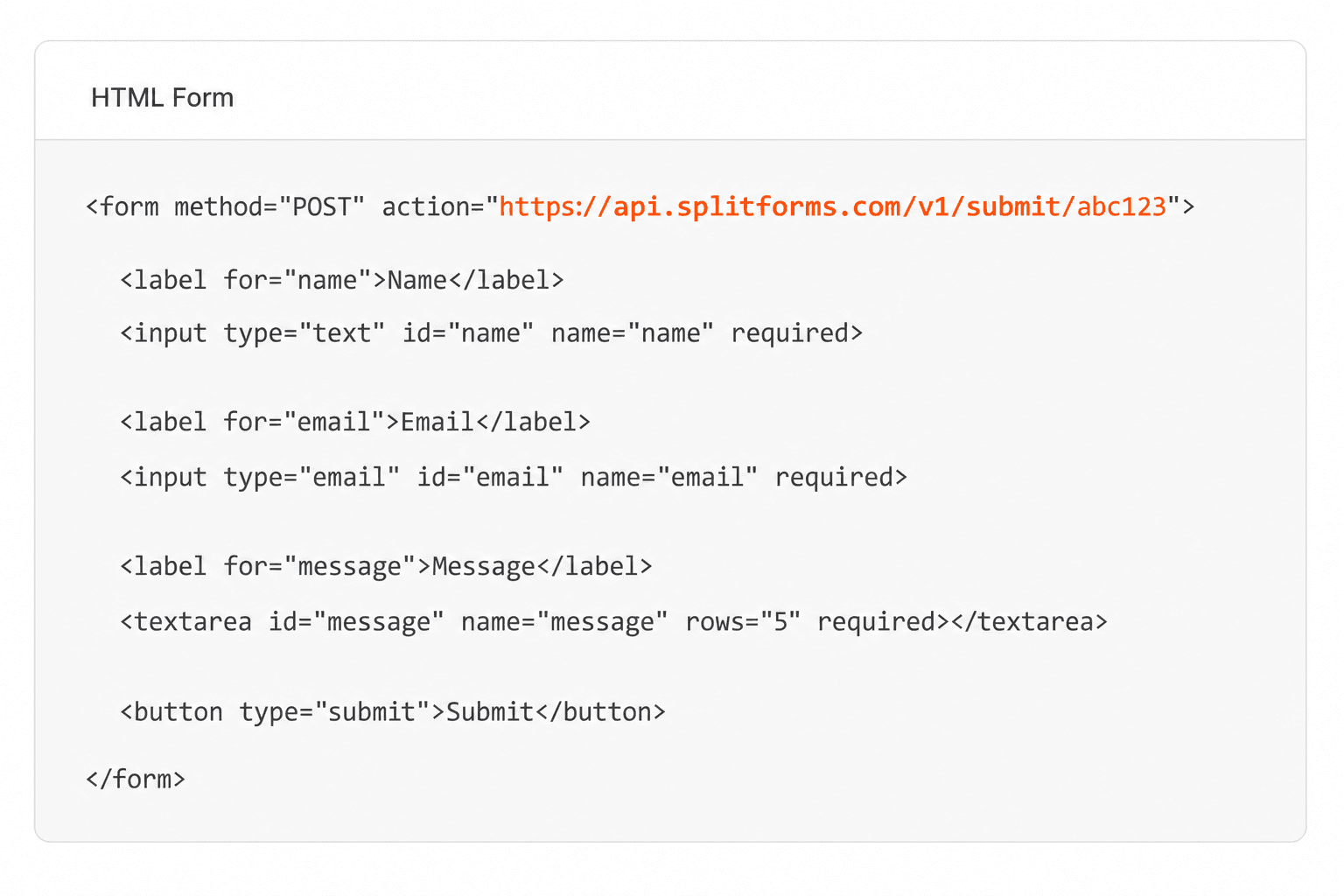
Add your endpoint

Point your form to your unique SplitForms endpoint. That's it.

HTML form pointing at a SplitForms submit endpoint

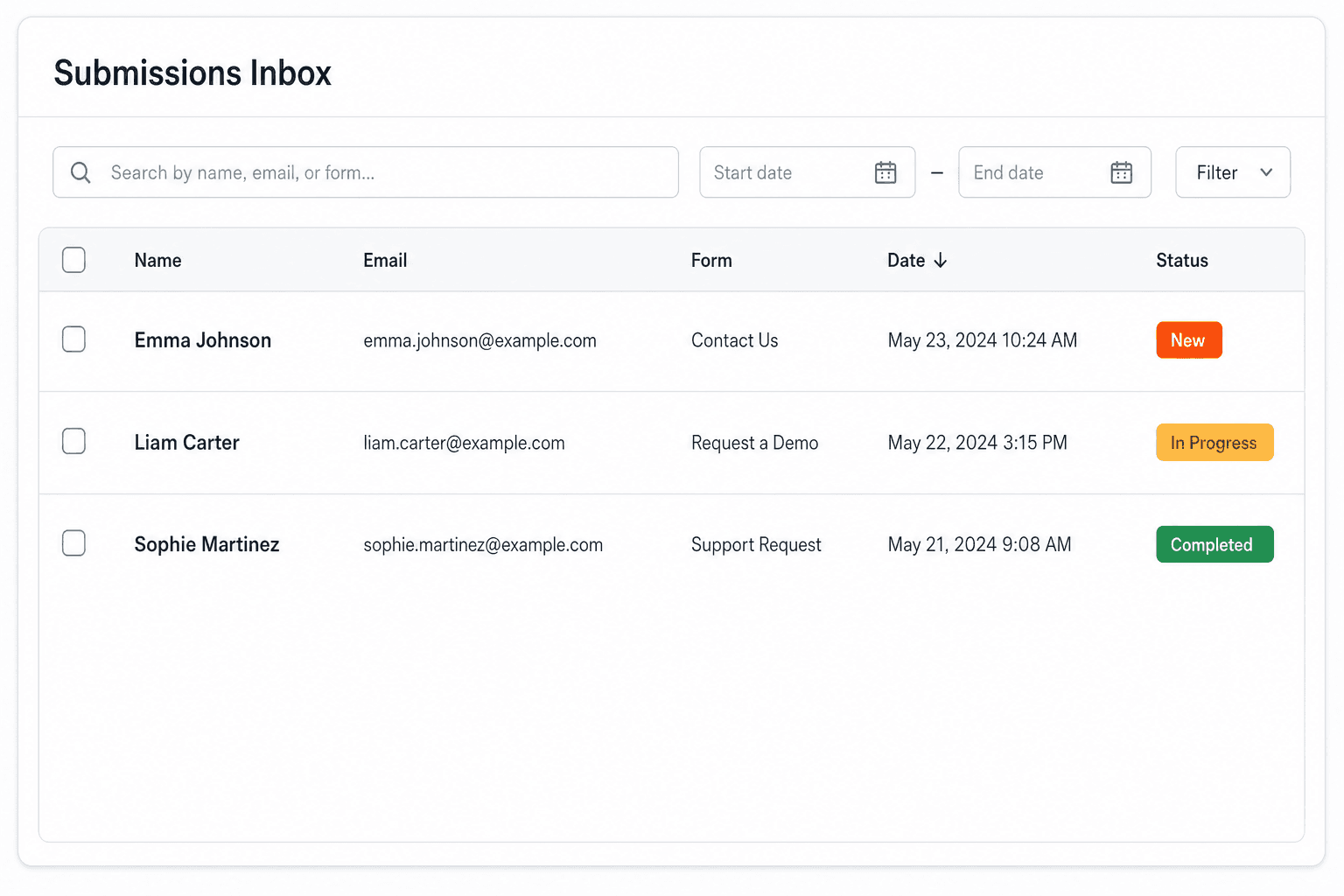
Receive submissions

We instantly capture and organize every submission in your inbox.

Submissions inbox with searchable leads and status pills

Route anywhere

Send data to email, spreadsheets, CRMs, webhooks, and 7,000+ apps.

Generic integration tiles for email, sheets, chat, CRM, automate, and webhook

No credit card required. Set up in under 60 seconds.

Connect & automate

Where can submissions go besides email?

On paid plans, submissions can also go to Slack, Discord, Google Sheets, Notion, Airtable, Zapier or any signed webhook — and splitforms works on the platforms you build on, from WordPress and Shopify to Next.js. With Stripe connected, your forms can take payments too.

Connect your SplitForms form to Slack, Google Sheets, Mailchimp, Zapier and more
NewTake payments on your formsDeposits, bookings, order forms — submitters check out through Stripe and the money goes straight to your Stripe account. Included on every paid plan.See payment forms →Need time slots? Online booking →

Setup guides for the stacks you use

Questions

HTML spellcheck Attribute questions, answered.

View all FAQs
How do I disable spellcheck on a textarea?

Add spellcheck="false" directly to the textarea tag: <textarea name="message" spellcheck="false"></textarea>. This prevents the browser from placing red underlines under unrecognized words.

Does spellcheck affect submitted form data?

No. The spellcheck attribute only modifies the browser's visual interface. Misspelled words are submitted exactly as typed, and the attribute value itself is never sent to the server.

Can I set spellcheck on the whole form?

Yes. Adding spellcheck="false" (or spellcheck="true") to the <form> element sets the inherited default for all text inputs and textareas inside that form. Any child element can override it by setting its own spellcheck attribute.

Why do red underlines still appear after setting spellcheck="false"?

Browser extensions (like grammar checkers) or operating-system spell checking can override the browser's native behavior and add underlines. Also ensure you wrote spellcheck="false", because a bare spellcheck attribute resolves to true.

Does spellcheck work on type=email?

Most browsers automatically disable spell checking on <input type="email">, <input type="url">, and <input type="password"> fields by default. Setting spellcheck="false" explicitly guarantees it stays off across all browsers.

Simple pricing

How much does splitforms cost?

Free gives you 500 submissions for $0 — no card, no time limit. Pro is $5/month for 5,000 submissions a month, and Annual is $49/year for 15,000 a month with every Pro feature.

Free

$0— 500 submissions
 

No card, no time limit

Best for testing

For side projects and indie devs.

  • 500 free submissions
  • Unlimited forms
  • Email notifications included
  • Smart spam filtering
  • Submissions dashboard
  • Redirect after submit
  • MCP server included

Annual

$49/ year
About $4.08 per month, billed yearly
Best value

Every Pro feature with triple the volume — $0.27 per 1,000 at full use.

  • 15,000 submissions per month
  • Unlimited forms
  • Everything in Pro
  • File uploads with 5 GB storage
  • 3 team seats
  • Priority email support

No credit card required on Free • Cancel anytime • Full pricing and FAQ