splitforms.com

HTML · FORM ATTRIBUTE

HTML pattern attribute: regex validation with copy-paste examples

Last reviewed

The pattern attribute gives a text-like <input> a regular expression its whole value must match before the form submits. Browsers anchor it for you and compile it with the v flag, so no ^ or $ is needed. An empty field skips the check, so add required too, and a title to explain the format.

  • Live, editable example
  • Copy-paste snippet
  • Attributes & common mistakes
Live demo · nothing is sent

What gets submitted

Fill in the form above and press its button. The demo stops the request and lists every name=value pair the browser would send, plus the controls it leaves out.

With a free access key in the form, these fields land in your splitforms dashboard; access_key and botcheck are read by splitforms, not stored as lead data.

Edit the HTML and re-run it
Runs in a sandbox. Nothing is sent.

Minimal snippet

pattern-example.html
<label for="zip">ZIP code</label>
<input type="text" id="zip" name="zip"
       pattern="\d{5}(?:-\d{4})?"
       title="5 digits, or 5+4 like 12345-6789"
       inputmode="numeric" required>

Copy-paste code

HTML Pattern Attribute code you can paste today.

Replace YOUR_ACCESS_KEY with a key from your free splitforms dashboard. The form posts to one endpoint — submissions land in your inbox and dashboard with spam filtering built in.

Get free access key
pattern.html
<form action="https://splitforms.com/api/submit" method="POST">
  <input type="hidden" name="access_key" value="YOUR_ACCESS_KEY">

  <label for="email">Email</label>
  <input type="email" id="email" name="email" autocomplete="email" required>

  <!-- US ZIP: 12345 or 12345-6789 -->
  <label for="zip">ZIP code</label>
  <input type="text" id="zip" name="zip" inputmode="numeric"
         pattern="\d{5}(?:-\d{4})?"
         title="5 digits, or 5+4 like 12345-6789" required>

  <!-- US/Canada phone, same pattern as /tools/phone-number-regex -->
  <label for="phone">Phone (optional)</label>
  <input type="tel" id="phone" name="phone" autocomplete="tel"
         pattern="(?:\+?1[\-.\s]?)?(?:\([2-9]\d{2}\)|[2-9]\d{2})[\-.\s]?[2-9]\d{2}[\-.\s]?\d{4}"
         title="A US or Canadian number, like (415) 555-0132">

  <!-- Username: 3-16 letters, digits or underscores -->
  <label for="username">Username</label>
  <input type="text" id="username" name="username"
         pattern="[a-zA-Z0-9_]{3,16}"
         title="3 to 16 letters, digits or underscores" required>

  <!-- Honeypot: hidden from people, bots fill it in -->
  <input type="checkbox" name="botcheck" style="display:none" tabindex="-1" autocomplete="off">

  <button type="submit">Send</button>
</form>

Key facts

How does the pattern attribute work?

The browser wraps the value of pattern as ^(?: + pattern + )$ and compiles it with the v flag, so the regex must match the whole value. While a non-empty value doesn't match, the field fails with patternMismatch and a normal submit is blocked.

How does the pattern attribute work?
FactDetail
AnchoringImplicit. pattern="\d{5}" means ^(?:\d{5})$, so 123456 fails. Adding your own ^ and $ is harmless but not needed.
Regex flagThe HTML Standard compiles it with the v flag, and current browsers follow it; older browsers used u. Under v, ( ) [ ] { } / - \ | must be escaped inside [ ], so write [\-.\s], not [-.\s].
Works on<input> with type text, search, url, tel, email or password. It does nothing on number, date or other types, or on <textarea>.
Empty fieldNot checked: an empty value never fails pattern. Add required to make the field mandatory.
Invalid regexIgnored: the field gets no pattern check at all. Browsers may log the error in the developer console.
With multipleOn type="email" multiple, each address must match on its own.
titleDescribes the format. Browsers may show it with the error message or as a tooltip; Chrome and Firefox add it to their error message.
JavaScriptel.validity.patternMismatch is true while a non-empty value doesn't match.
SecurityNone. Anyone can POST without running it, so check the value on the server with the same regex.

Sources: WHATWG HTML Standard: the pattern attribute · WHATWG: compiled pattern regular expression · WHATWG: suffering from a pattern mismatch · MDN: pattern · MDN: ValidityState.patternMismatch

Copy-paste patterns

Which pattern should I use for common fields?

Paste the pattern straight into the attribute: no slashes, no ^ or $. Every pattern below compiles with the v flag. The phone patterns are the same ones the phone number regex tester tests, so you can try more numbers there.

Which pattern should I use for common fields?
FieldpatternMatchesRejects
US ZIP code\d{5}(?:-\d{4})?90210, 90210-12349021, 90210-12
UK postcode[A-Za-z]{1,2}\d[A-Za-z\d]? ?\d[A-Za-z]{2}SW1A 1AA, M1 1AE, B33 8TH12345. A shape check only: it does not prove the postcode exists.
US / Canada phone(?:\+?1[\-.\s]?)?(?:\([2-9]\d{2}\)|[2-9]\d{2})[\-.\s]?[2-9]\d{2}[\-.\s]?\d{4}(415) 555-0132, 415.555.0132, +1 415 555 0132123-456-7890 (area code starts with 1)
International phone (E.164)\+[1-9]\d{1,14}+141555501324155550132 (no + or country code)
Username[a-zA-Z0-9_]{3,16}jane_doejd (too short), jane-doe (hyphen)
Password (8+, lowercase, uppercase, digit)(?=.*[a-z])(?=.*[A-Z])(?=.*\d).{8,}Abcdefg1abcdefgh (no uppercase or digit). Pick other rules with the password regex generator.
Hex colour#(?:[0-9a-fA-F]{3}){1,2}#ff4f00, #f40ff4f00 (no #), #ff4f0
Not just spaces.*\S.*Hi, a (spaces only)

For a full email check, use type="email" instead of a pattern; see the email input page. Test the whole form, patterns included, with the form validator.

Sources: WHATWG: compiled pattern regular expression · MDN: pattern · MDN: <input type="tel">

Attributes · pattern

Which attributes and APIs work with pattern?

These explain the pattern, make the field mandatory or read the result. The required attribute page covers when the browser skips validation.

HTML Pattern Attribute attributes and what each one does
AttributeWhat it doesDocs
patternA regular expression the whole value must match. Anchored and compiled with the v flag by the browser.MDN
titleDescribes the expected format. Browsers may show it with the pattern error. Repeat the hint in visible text, because not everyone sees a title.MDN
requiredMakes the field mandatory. pattern alone lets an empty field through.MDN
minlength / maxlengthLength limits checked separately from the pattern, with their own messages.MDN
inputmodePicks the mobile keyboard, for example numeric for a ZIP code typed into type="text".MDN
validity.patternMismatchJavaScript: true while a non-empty value doesn't match.MDN
setCustomValidity()JavaScript: replaces the browser's message. Clear it with "" on every edit, or the field stays invalid.MDN

Common mistakes

What are the common pattern attribute mistakes?

Most patterns that "do nothing" fail for one of these reasons.

  1. An unescaped - inside [ ] breaks the whole pattern

    Under the v flag, [-.\s] is a syntax error, and an invalid pattern is ignored, so the field accepts anything. Write [\-.\s] and check the console.

  2. pattern does nothing on number or date inputs

    It only applies to text, search, url, tel, email and password. Use min, max and step on number and date fields.

  3. An empty field passes

    pattern never fails an empty value. Add required when the field must be filled in.

  4. Slashes and flags are not part of the attribute

    pattern="/\d+/i" looks for literal slashes and an i. Write the regex body only; for case-insensitive matching, list both cases, as in [A-Za-z].

Sources: WHATWG HTML Standard: the pattern attribute · WHATWG: suffering from a pattern mismatch · MDN: pattern · MDN: Constraint validation

:user-invalid

How do I style fields that fail the pattern?

Use :user-invalid. :invalid matches as soon as the value stops matching, so a ZIP field turns red on the first digit. :user-invalid waits until the person has changed the field and moved on, or tried to submit. MDN lists it as Baseline since November 2023.

pattern-styles.html
<label for="zip">ZIP code</label>
<input type="text" id="zip" name="zip" inputmode="numeric"
       pattern="\d{5}(?:-\d{4})?" aria-describedby="zip-hint">
<p id="zip-hint" class="hint">5 digits, or 5+4 like 12345-6789</p>

<style>
  /* :invalid would flag the field while it is still being typed */
  input:user-invalid {
    border-color: #c93d00;
    outline: 2px solid #c93d00;
    outline-offset: 1px;
  }
  input:user-invalid + .hint { color: #c93d00; }
</style>

title + setCustomValidity

How do I show a clear error for a pattern?

Put the format in title so browsers can add it to their error, and show the same hint as visible text. For your own wording, set it in the invalid event when validity.patternMismatch is true and clear it on every edit.

pattern-message.html
<label for="username">Username</label>
<input type="text" id="username" name="username"
       pattern="[a-zA-Z0-9_]{3,16}"
       title="3 to 16 letters, digits or underscores" required>

<script>
  const user = document.getElementById("username");
  user.addEventListener("invalid", () => {
    if (user.validity.patternMismatch) {
      user.setCustomValidity("Use 3 to 16 letters, digits or underscores.");
    }
  });
  // Clear it on every edit, or the field stays invalid for good
  user.addEventListener("input", () => user.setCustomValidity(""));
</script>

Copy-paste ready

The HTML Pattern Attribute example below is a complete, working form — paste it into any HTML page and it submits, no edits to the markup required.

No backend to build

Your html pattern attribute form posts to one endpoint. No server, PHP, or API route — accepted submissions are saved to your dashboard before owner notification email is attempted; delivery time and inbox placement depend on provider and recipient settings.

A form that really submits

Unlike a static reference snippet, this pattern form actually sends data to a free splitforms backend, with spam filtering built in.

How it works

How to add HTML Pattern Attribute to any page.

Copy the html pattern attribute example, drop in your free access key, and paste it into any page — submissions start landing in your dashboard.

Copy the code

Copy the HTML Pattern Attribute example below.

Add your access key

Replace YOUR_ACCESS_KEY with a free splitforms key from the dashboard.

Paste into your site

Drop the form into any HTML page. Submissions arrive in your dashboard.

How SplitForms works

What happens after someone submits your form?

splitforms receives the submission, filters spam, saves it to your dashboard and emails you — then, on paid plans, sends it on to your webhooks and integrations. No backend infrastructure to build.

A SplitForms contact form submission launching straight to your inbox

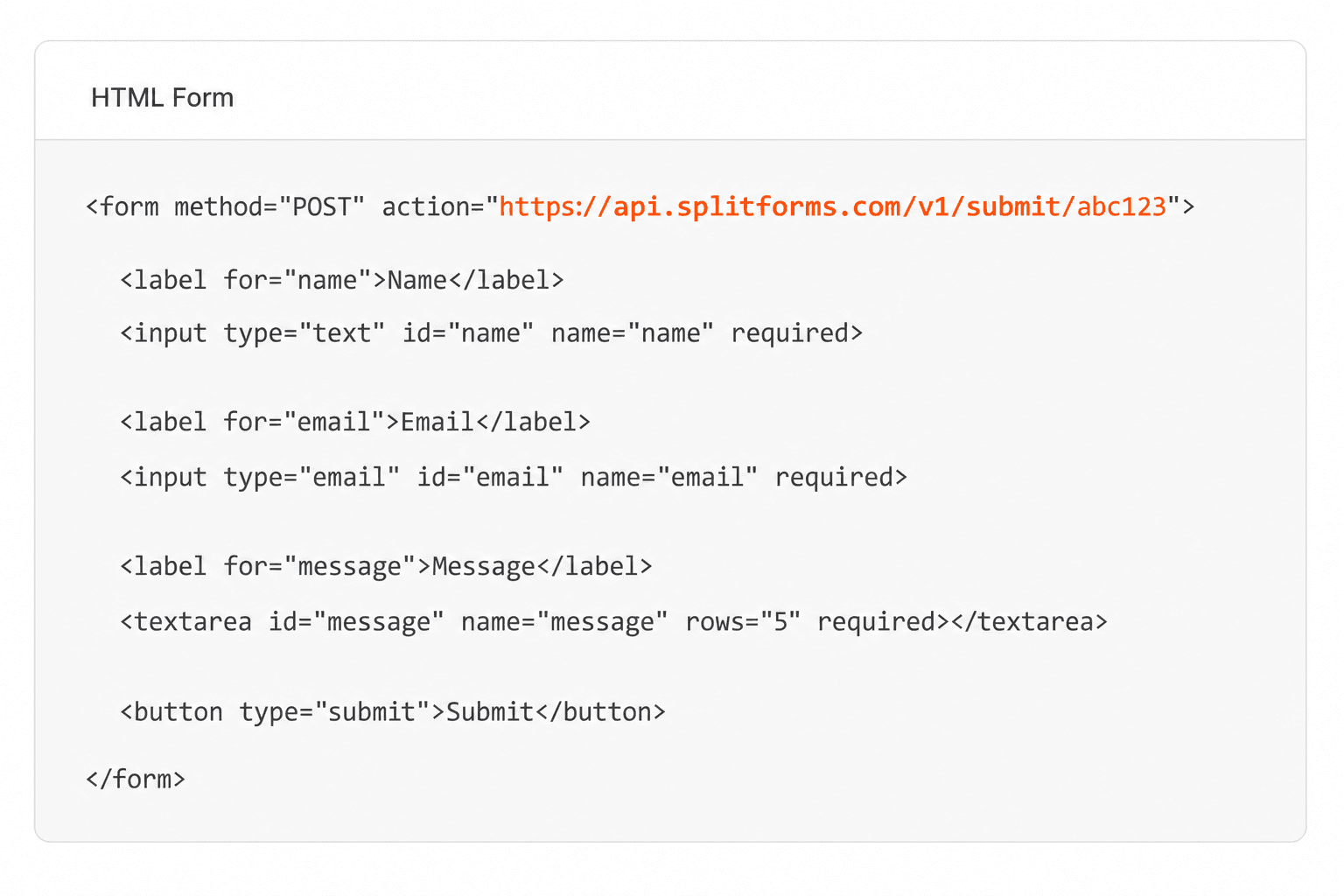
Add your endpoint

Point your form to your unique SplitForms endpoint. That's it.

HTML form pointing at a SplitForms submit endpoint

Receive submissions

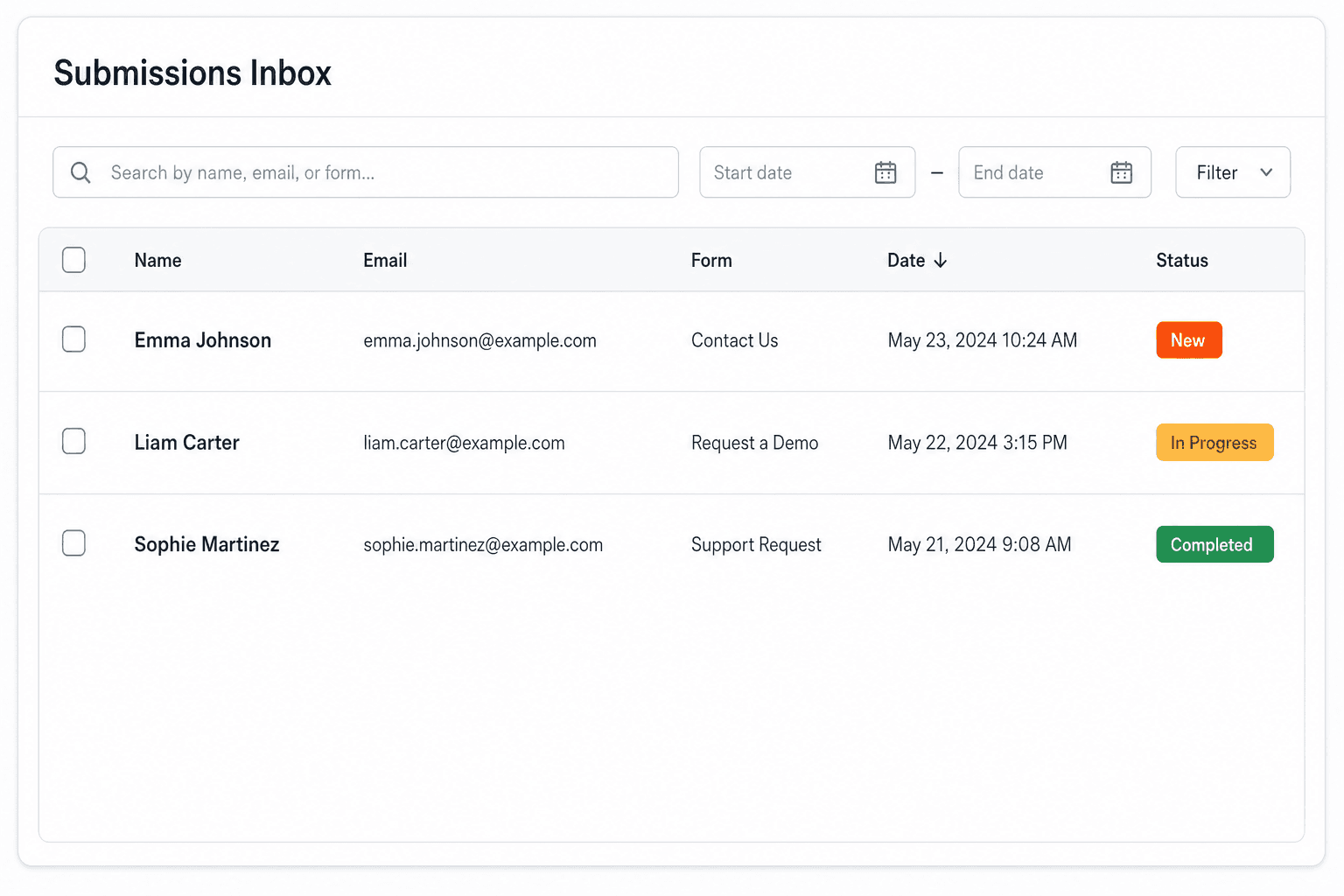
We instantly capture and organize every submission in your inbox.

Submissions inbox with searchable leads and status pills

Route anywhere

Send data to email, spreadsheets, CRMs, webhooks, and 7,000+ apps.

Generic integration tiles for email, sheets, chat, CRM, automate, and webhook

No credit card required. Set up in under 60 seconds.

Connect & automate

Where can submissions go besides email?

On paid plans, submissions can also go to Slack, Discord, Google Sheets, Notion, Airtable, Zapier or any signed webhook — and splitforms works on the platforms you build on, from WordPress and Shopify to Next.js. With Stripe connected, your forms can take payments too.

Connect your SplitForms form to Slack, Google Sheets, Mailchimp, Zapier and more
NewTake payments on your formsDeposits, bookings, order forms — submitters check out through Stripe and the money goes straight to your Stripe account. Included on every paid plan.See payment forms →Need time slots? Online booking →

Setup guides for the stacks you use

Questions

HTML Pattern Attribute questions, answered.

View all FAQs
What does the pattern attribute do in HTML?

It sets a regular expression that the whole value of an <input> must match. While a non-empty value doesn't match, the browser blocks a normal submit and shows an error. It works on text, search, url, tel, email and password inputs.

Do I need ^ and $ in an HTML pattern?

No. The browser wraps the pattern as ^(?: and )$ for you, so it always has to match the whole value. Adding your own ^ and $ does no harm.

Which regex flag does the pattern attribute use?

The HTML Standard compiles it with the v flag (unicodeSets), and current browsers follow it. Under v, characters such as ( ) [ ] { } / - \ and | must be escaped inside a character class, so [-.\s] is invalid and must be written [\-.\s]. An invalid pattern is ignored.

Why does my pattern attribute not work?

Usually one of four things: the regex is invalid under the v flag (often an unescaped - inside [ ]), so the browser ignores it; the input type is number, date or another type pattern doesn't apply to; the field is empty, which pattern never rejects; or the form has novalidate.

How do I show what format the pattern expects?

Add a title attribute that describes the format, such as title="5 digits, like 12345". Browsers may show it with the error message; Chrome and Firefox do. Repeat the hint in visible text next to the field, because a title is not shown to everyone.

Can I use pattern on a textarea?

No. pattern only applies to <input> elements of type text, search, url, tel, email and password. For a textarea, check the value with JavaScript and setCustomValidity(), and again on the server.

Is the pattern attribute enough to validate input?

No. It only runs in the browser, and anyone can POST to your endpoint without it. Check the value on the server with the same regex before you act on it.

Simple pricing

How much does splitforms cost?

Free gives you 500 submissions for $0 — no card, no time limit. Pro is $5/month for 5,000 submissions a month, and Annual is $49/year for 15,000 a month with every Pro feature.

Free

$0— 500 submissions
 

No card, no time limit

Best for testing

For side projects and indie devs.

  • 500 free submissions
  • Unlimited forms
  • Email notifications included
  • Smart spam filtering
  • Submissions dashboard
  • Redirect after submit
  • MCP server included

Annual

$49/ year
About $4.08 per month, billed yearly
Best value

Every Pro feature with triple the volume — $0.27 per 1,000 at full use.

  • 15,000 submissions per month
  • Unlimited forms
  • Everything in Pro
  • File uploads with 5 GB storage
  • 3 team seats
  • Priority email support

No credit card required on Free • Cancel anytime • Full pricing and FAQ