
splitforms.com

HTML · INPUT ATTRIBUTE

HTML form attribute: submit fields that sit outside the <form>

Last reviewed

A control is normally only submitted with the <form> that contains it. Set form="contact" (the form's id) on an input, select, textarea or button anywhere on the page to link it to that form. Its value is submitted, a submit button submits and validates that form, and the attribute overrides the nearest containing form.

  • Live, editable example
  • Copy-paste snippet
  • Attributes & common mistakes
Live demo · nothing is sent

What gets submitted

Fill in the form above and press its button. The demo stops the request and lists every name=value pair the browser would send, plus the controls it leaves out.

With a free access key in the form, these fields land in your splitforms dashboard; access_key and botcheck are read by splitforms, not stored as lead data.

Edit the HTML and re-run it
Runs in a sandbox. Nothing is sent.

Minimal snippet

form-attribute-example.html
<form id="contact" action="/submit" method="POST"></form>

<input name="email" form="contact">
<button type="submit" form="contact">Send</button>

Copy-paste code

HTML form attribute code you can paste today.

Replace YOUR_ACCESS_KEY with a key from your free splitforms dashboard. The form posts to one endpoint — submissions land in your inbox and dashboard with spam filtering built in.

Get free access key
form-attribute.html
<form id="contact" action="https://splitforms.com/api/submit" method="POST">
  <input type="hidden" name="access_key" value="YOUR_ACCESS_KEY">

  <label for="message">Message</label>
  <textarea id="message" name="message" rows="5" required></textarea>

  <!-- Honeypot: hidden from people, bots fill it in -->
  <input type="checkbox" name="botcheck" style="display:none">
</form>

<!-- Outside the form, but linked to it by form="contact" -->
<label for="email">Email</label>
<input type="email" id="email" name="email" autocomplete="email" form="contact" required>

<button type="submit" form="contact">Send</button>

form attribute

What does the form attribute change?

form="contact" makes a control part of the form with id="contact", wherever it sits on the page. It is submitted, validated and listed with that form only.

What does the form attribute change?
SituationWithout form=With form="contact"
Input outside the formNot submittedSubmitted
Submit button outside the formDoes nothingSubmits and validates the form
Input inside form A with form="B"Sent with ASent with B only
form="" or an id that doesn't existn/aBelongs to no form, so it is never submitted
form.elements and new FormData(form)Only nested controlsInclude the linked control too

Sources: WHATWG HTML Standard: constructing the entry list · WHATWG HTML Standard: the form attribute

Attributes · form

Which attributes go with form?

form links a control to a form by id. The control still needs a name to be sent.

HTML form attribute attributes and what each one does
AttributeWhat it does
formThe id of the form this control belongs to. Not the form's name.
idSet on the <form>. This is the value form= points at.
nameStill needed on the linked control. Without it, the value isn't sent.
formactionOn a linked submit button, still overrides the form's action.

Common mistakes

form attribute mistakes to avoid

Most bugs come from a wrong id or a missing name.

  1. form= takes the form's id, not its name

    form="contact" looks for id="contact". A <form name="contact"> without that id is not found.

  2. A control can't belong to two forms

    The value is a single id, never a list. form="a b" looks for one form with the id a b, which doesn't exist.

  3. A missing id means the field is never sent

    If form= points to an id that isn't on the page, the control belongs to no form at all, even if it sits inside one.

  4. A linked field still needs a name

    form= only links the control. Without a name attribute its value is left out of the submission.

Sources: WHATWG HTML Standard: the form attribute · MDN: <input> form attribute
Copy-paste ready

The HTML form attribute example below is a complete, working form — paste it into any HTML page and it submits, no edits to the markup required.

No backend to build

Your html form attribute form posts to one endpoint. No server, PHP, or API route — accepted submissions are saved to your dashboard before owner notification email is attempted; delivery time and inbox placement depend on provider and recipient settings.

A form that really submits

Unlike a static reference snippet, this form form actually sends data to a free splitforms backend, with spam filtering built in.

How it works

How to add HTML form attribute to any page.

Copy the html form attribute example, drop in your free access key, and paste it into any page — submissions start landing in your dashboard.

Copy the code

Copy the HTML form attribute example below.

Add your access key

Replace YOUR_ACCESS_KEY with a free splitforms key from the dashboard.

Paste into your site

Drop the form into any HTML page. Submissions arrive in your dashboard.

How SplitForms works

What happens after someone submits your form?

splitforms receives the submission, filters spam, saves it to your dashboard and emails you — then, on paid plans, sends it on to your webhooks and integrations. No backend infrastructure to build.

A SplitForms contact form submission launching straight to your inbox

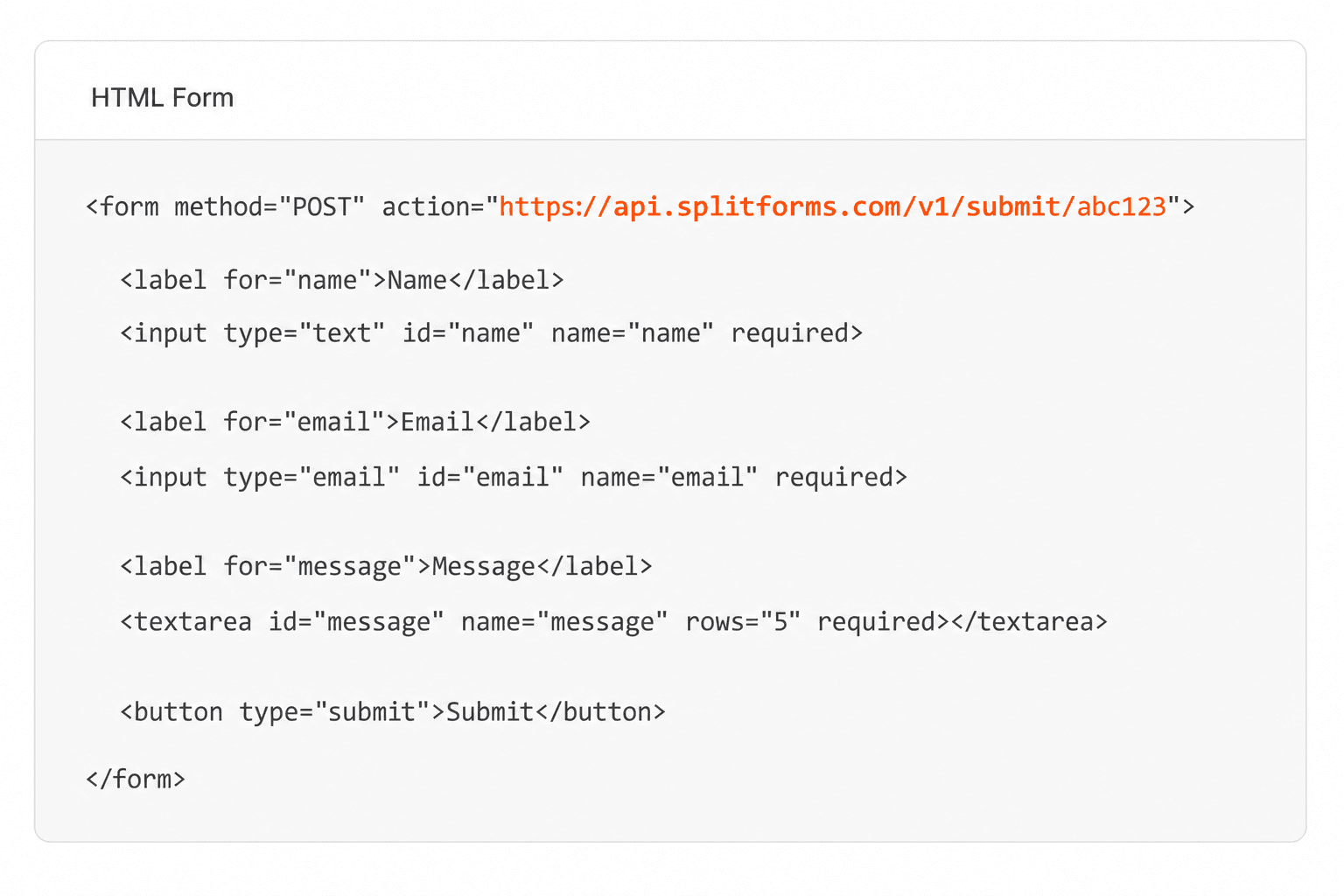
Add your endpoint

Point your form to your unique SplitForms endpoint. That's it.

HTML form pointing at a SplitForms submit endpoint

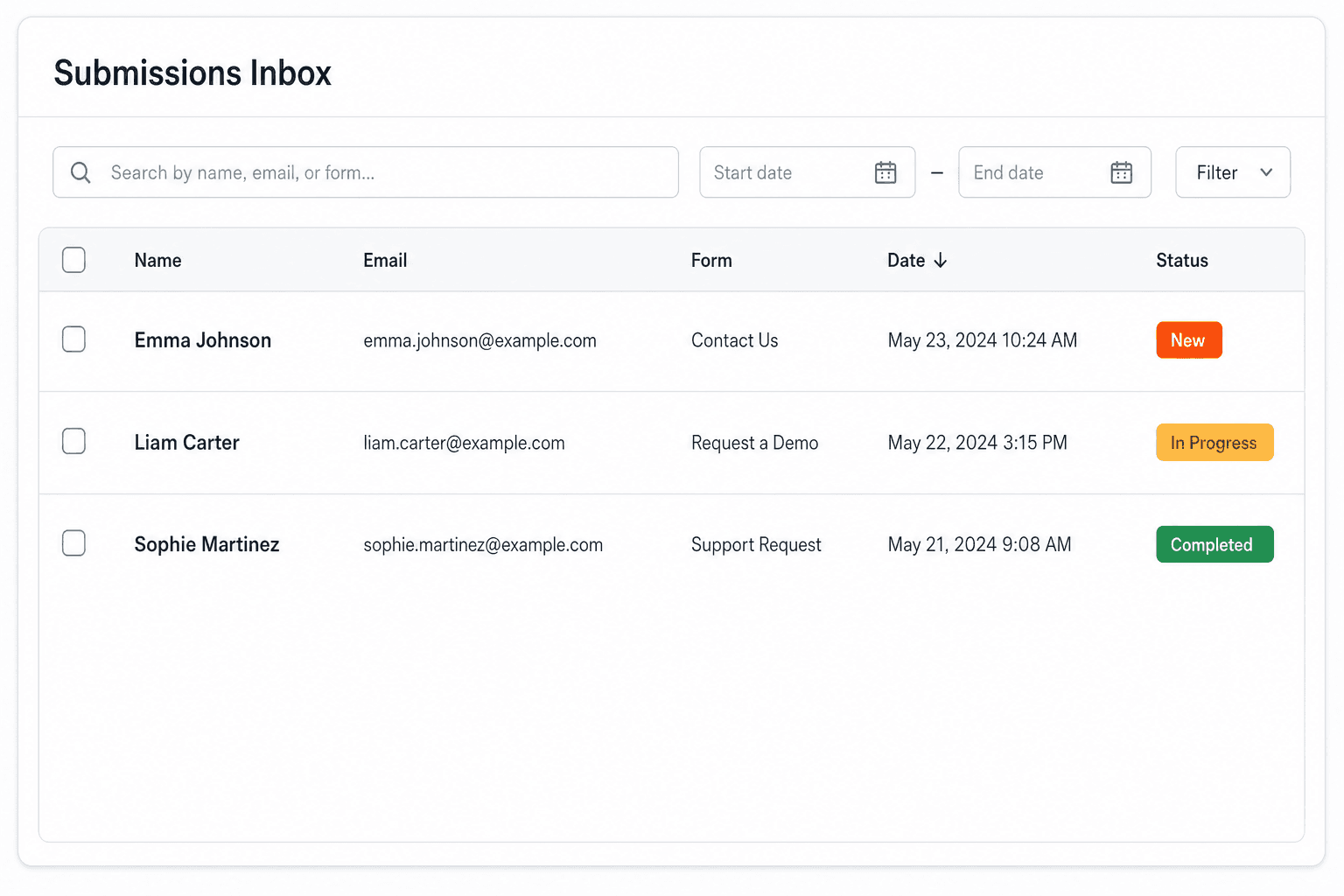
Receive submissions

We instantly capture and organize every submission in your inbox.

Submissions inbox with searchable leads and status pills

Route anywhere

Send data to email, spreadsheets, CRMs, webhooks, and 7,000+ apps.

Generic integration tiles for email, sheets, chat, CRM, automate, and webhook

No credit card required. Set up in under 60 seconds.

Connect & automate

Where can submissions go besides email?

On paid plans, submissions can also go to Slack, Discord, Google Sheets, Notion, Airtable, Zapier or any signed webhook — and splitforms works on the platforms you build on, from WordPress and Shopify to Next.js. With Stripe connected, your forms can take payments too.

Connect your SplitForms form to Slack, Google Sheets, Mailchimp, Zapier and more
NewTake payments on your formsDeposits, bookings, order forms — submitters check out through Stripe and the money goes straight to your Stripe account. Included on every paid plan.See payment forms →Need time slots? Online booking →

Setup guides for the stacks you use

Questions

HTML form attribute questions, answered.

View all FAQs
How do I submit an input that is outside the form?

Give the form an id, for example id="contact", and add form="contact" to the input. The input can sit anywhere on the page and its value is submitted with that form, as long as it has a name.

Can a submit button be outside the form?

Yes. Add form="contact" to a <button type="submit">, where contact is the form's id. Clicking it validates and submits that form, just like a button inside it.

Can one input belong to two forms?

No. The form attribute takes a single id, so a control belongs to one form at most. To send the same value with two forms, use a second input or copy the value with JavaScript.

Does FormData include inputs with the form attribute?

Yes. new FormData(form) and form.elements include every control linked with form="id", not only the ones nested inside the form.

Is the form attribute supported in all browsers?

Yes. All current browsers support the form attribute on inputs, selects, textareas and buttons. No fallback is needed today.

Simple pricing

How much does splitforms cost?

Free gives you 500 submissions for $0 — no card, no time limit. Pro is $5/month for 5,000 submissions a month, and Annual is $49/year for 15,000 a month with every Pro feature.

Free

$0— 500 submissions
 

No card, no time limit

Best for testing

For side projects and indie devs.

  • 500 free submissions
  • Unlimited forms
  • Email notifications included
  • Smart spam filtering
  • Submissions dashboard
  • Redirect after submit
  • MCP server included

Annual

$49/ year
About $4.08 per month, billed yearly
Best value

Every Pro feature with triple the volume — $0.27 per 1,000 at full use.

  • 15,000 submissions per month
  • Unlimited forms
  • Everything in Pro
  • File uploads with 5 GB storage
  • 3 team seats
  • Priority email support

No credit card required on Free • Cancel anytime • Full pricing and FAQ