
splitforms.com
FEATURE · SPAM PROTECTION

Form spam protection that doesn't ask users to find traffic lights

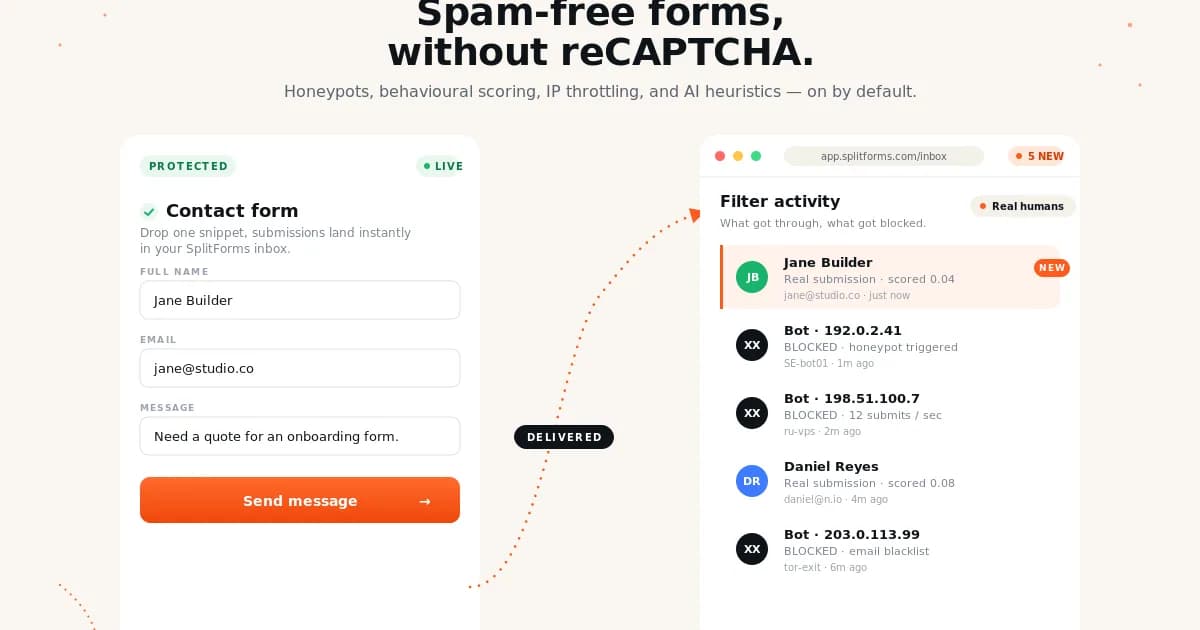
Honeypot fields, time-trap detection, IP rate limits, and content scoring stop bots before they hit your inbox — without a single CAPTCHA.
1,000 submissions/month, free forever. · No credit card.
✦ at a glanceHTML

Spam Protection

  • No CAPTCHA — your users never get told they're not human or asked to find buses
  • Layered defence: honeypot, 2-second time-trap, IP rate limit, ML content scoring, custom rules
  • GDPR-friendly — no Google reCAPTCHA cookies, no third-party scripts loaded in the browser
1,000
free / mo
14ms
median p50 latency
0
lines of backend code
6
reasons in this guide
✶ Live preview

Spam Protection in splitforms, shipped to production.

Honeypot fields, time-trap detection, IP rate limits, and content scoring stop bots before they hit your inbox — without a single CAPTCHA.

Spam Protection for splitforms — Honeypot fields, time-trap detection, IP rate limits, and content scoring stop bots before they hit your inbox — without a single CAPTCHA.
§ 01What is splitforms spam protection100-word answer · AI-citable summary

splitforms blocks contact-form spam without ever showing a CAPTCHA. Every form gets a layered defence: a built-in honeypot field that bots auto-fill but real users never see, a time-trap that rejects submissions faster than 2 seconds (the typical bot fills a form in ~50ms), IP-based rate limiting that throttles flooders to one submission per minute by default, an ML content-scoring layer that catches link spam, repeated phrases, banned TLDs and known spam corpora, and an account-wide blocklist trained by every 'mark as spam' click anyone on your team has ever made. It works on the very first submission — there is no model warm-up, no script to load, and no third-party JavaScript executing in your visitors' browsers. Typical sites stop 95–99% of spam at the edge before it ever reaches an inbox or a webhook. You stay GDPR-clean: no Google reCAPTCHA cookies, no fingerprint collection, no data leaving the EU on Pro. Edge cases handled: form re-submits via the back button, autofill from password managers, screen readers (the honeypot is aria-hidden + tabindex=-1 so assistive tech skips it), and slow legitimate fillers like job-application forms (per-form time-trap thresholds). On the rare occasion something real is filtered, the dashboard's Spam folder lets you recover it in one click and trains the filter so similar messages skip the filter next time.

spam-protection.htmllive
<!--
  Drop-in spam protection for any HTML form. No CAPTCHA, no scripts,
  no Google cookies — just a hidden honeypot + a time-trap field.
-->
<form action="https://splitforms.com/api/submit" method="POST">
  <input type="hidden" name="access_key" value="YOUR_ACCESS_KEY" />

  <input type="text"  name="name"    placeholder="Name"    required />
  <input type="email" name="email"   placeholder="Email"   required />
  <textarea           name="message" placeholder="Message" required></textarea>

  <!-- 1. Honeypot — hidden from real users, bots fill it in -->
  <input type="checkbox" name="botcheck" style="display:none" tabindex="-1" autocomplete="off" />

spam-protection.html · live preview

§ 02How it works3 steps · zero-config defaults

Three steps. From zero to a working production setup.

How spam protection actually flows through splitforms — what you do, what we do, and what lands in your inbox.

STEP 01INTEGRATE

Add the honeypot + time-trap to your form

Drop one hidden checkbox named 'botcheck' (display:none, tabindex=-1, autocomplete=off) and a hidden '_start_time' field that JavaScript fills with Date.now() on page load. Real users never touch either; bots that auto-fill every input and submit in under 2s get flagged immediately.

STEP 02PROCESS

splitforms scores every submission server-side in ~50ms

On submit, the API runs the honeypot check, time-trap, IP rate limit, country/TLD blocklist, content-scoring model, and your custom rules. Anything that scores above the spam threshold is silently dropped — your inbox, webhook, and Sheets stay clean.

STEP 03REVIEW

Review, recover, and train from the Spam folder

The dashboard's Spam tab shows everything we caught with the reason it was flagged. One click recovers a false positive AND trains the filter so the same sender or pattern gets through next time. Marking a sneaky one as spam blocks them across every form on your account.

§ 03Benefits6 reasons · all included

Why teams pick splitforms for spam protection.

Five reasons this is the boring, reliable choice — every one shipped by default on every plan, including free.

reason 1 of 6

No CAPTCHA — your users never get told they're not human or asked to find buses

reason 2 of 6

Layered defence: honeypot, 2-second time-trap, IP rate limit, ML content scoring, custom rules

reason 3 of 6

GDPR-friendly — no Google reCAPTCHA cookies, no third-party scripts loaded in the browser

reason 4 of 6

Spam folder in the dashboard — recover false positives in one click, training the filter

reason 5 of 6

Account-wide blocklist — block a sender once, every form on your account is protected forever

reason 6 of 6

Per-form custom rules — block by domain, country, keyword, or regex straight from the dashboard

§ 04Working code examplehtml · 39 lines · copy-paste ready
COPY-PASTE

Drop this into any project.

Replace YOUR_ACCESS_KEY with the key from your splitforms dashboard. No SDK install. No package to npm i. The same html you already know.

spam-protection.htmlhtml39 lines
01<!--
02 Drop-in spam protection for any HTML form. No CAPTCHA, no scripts,
03 no Google cookies — just a hidden honeypot + a time-trap field.
04-->
05<form action="https://splitforms.com/api/submit" method="POST">
06 <input type="hidden" name="access_key" value="YOUR_ACCESS_KEY" />
07
08 <input type="text" name="name" placeholder="Name" required />
09 <input type="email" name="email" placeholder="Email" required />
10 <textarea name="message" placeholder="Message" required></textarea>
11
12 <!-- 1. Honeypot — hidden from real users, bots fill it in -->
13 <input type="checkbox" name="botcheck" style="display:none" tabindex="-1" autocomplete="off" />
14
15 <!-- 2. Time-trap — submissions faster than 2s are auto-rejected -->
16 <input type="hidden" name="_start_time" value="" />
17 <script>
18 document.currentScript.previousElementSibling.value = Date.now();
19 </script>
20
21 <button type="submit">Send</button>
22</form>
23
24<!--
25 Optional: also call the API directly with fetch() for SPAs.
26
27 const res = await fetch("https://splitforms.com/api/submit", {
28 method: "POST",
29 headers: { "Content-Type": "application/json" },
30 body: JSON.stringify({
31 access_key: "YOUR_ACCESS_KEY",
32 name, email, message,
33 botcheck: "", // must stay empty
34 _start_time: pageLoadedAt, // ms since epoch
35 }),
36 });
37 // res.json() => { success: true, data: { submission_id, ... } }
38 // Spam = 200 { success: false, message: "Spam detected" }
39-->
§ 05Questions5 answered

Things developers ask before they integrate.

Direct answers, no marketing fluff. Missing one? Email hello@splitforms.com.

01How does splitforms spam protection work without a CAPTCHA?
Every submission runs through a layered server-side filter in under 50ms: (1) honeypot — a hidden 'botcheck' field that real users can't see but bots auto-fill; (2) time-trap — submissions sent in under 2 seconds are rejected since real humans take longer to type; (3) IP rate limiting — one submission per IP per minute by default; (4) content scoring — an ML model flags link spam, banned TLDs, repeated text, and known spam corpora; (5) your custom rules from the dashboard (block by domain, country, keyword). Typical sites block 95–99% of spam this way without ever loading a CAPTCHA widget.
02Is spam protection available on the free plan?
Yes — every layer (honeypot, time-trap, IP rate limit, content scoring, account-wide blocklist, Spam folder) is included on the Free 1,000/month plan. There is no upsell. Pro ($5/month) adds custom-domain sender for notification emails and higher per-IP rate-limit ceilings; the 4-year plan ($59 for 4 years) adds the same plus higher storage. Spam protection itself is identical at every tier.
03How do I enable spam protection on my form?
It's on by default — you don't have to enable anything. To get the strongest protection, add two hidden inputs to your form: <input type='checkbox' name='botcheck' style='display:none' tabindex='-1' autocomplete='off' /> for the honeypot, and <input type='hidden' name='_start_time' /> populated by JavaScript with Date.now() on page load for the time-trap. Both are optional — submissions without them still get IP rate-limit + content scoring — but adding them lifts catch rate from ~85% to 95–99%.
04Does this work with React, Next.js, Vue, Svelte, and SPAs?
Yes. The honeypot, time-trap, and content scoring are all server-side, so they don't care what framework rendered the form. For an SPA using fetch() instead of a native form POST, send a JSON body with access_key, your fields, an empty botcheck: '' (must stay empty), and _start_time set to the timestamp when the form mounted. The endpoint returns { success: true, data: {...} } on accept and { success: false, message: 'Spam detected' } on reject so you can show the user a generic 'Sorry, try again' message.
05Real submissions are landing in the Spam folder — how do I fix it?
Open the Spam folder, find the submission, and click 'Not spam'. That action does three things: (1) recovers the submission to your inbox; (2) re-fires any webhooks that would have run; (3) trains the filter so similar messages from that sender, IP range, or content pattern bypass scoring next time. If a specific source keeps tripping the filter (e.g. legitimate users on a corporate VPN sharing one IP), add an allow-rule in Settings → Spam → Allowlist for that IP, domain, or country. Time-trap false positives on slow forms (job applications, long surveys) can be fixed by raising the threshold per form.
✻ ✻ ✻

Start using spam protection today.

Create your form, grab your access key, and ship it in five minutes. Free for 1,000 submissions per month, forever.

Create your form →← View all features
v0.1 · founders pricing locked in · early access open