splitforms.com

HTML · INPUT ATTRIBUTE

HTML min and max attributes: limit number and date inputs

Last reviewed

min and max set the allowed range for number, range, date, time, datetime-local, month and week inputs. A value outside it sets validity.rangeUnderflow or validity.rangeOverflow and blocks the submit, while a range slider clamps to the limit instead. They don't apply to text inputs; use minlength and maxlength there.

  • Live, editable example
  • Copy-paste snippet
  • Attributes & common mistakes
Live demo · nothing is sent

What gets submitted

Fill in the form above and press its button. The demo stops the request and lists every name=value pair the browser would send, plus the controls it leaves out.

With a free access key in the form, these fields land in your splitforms dashboard; access_key and botcheck are read by splitforms, not stored as lead data.

Edit the HTML and re-run it
Runs in a sandbox. Nothing is sent.

Minimal snippet

min-max-example.html
<input type="number" name="guests" min="1" max="10" step="1" required>

Copy-paste code

HTML min and max attributes code you can paste today.

Replace YOUR_ACCESS_KEY with a key from your free splitforms dashboard. The form posts to one endpoint — submissions land in your inbox and dashboard with spam filtering built in.

Get free access key
min-max.html
<form action="https://splitforms.com/api/submit" method="POST">
  <input type="hidden" name="access_key" value="YOUR_ACCESS_KEY">

  <label for="guests">Number of guests</label>
  <input type="number" id="guests" name="guests" min="1" max="10" step="1" required>

  <!-- In real use, set min to today's date with JavaScript -->
  <label for="date">Date</label>
  <input type="date" id="date" name="date" min="2026-11-03" max="2026-12-31" required>

  <label for="time">Time</label>
  <input type="time" id="time" name="time" min="09:00" max="17:00" required>

  <!-- Honeypot: hidden from people, bots fill it in -->
  <input type="checkbox" name="botcheck" style="display:none">

  <button type="submit">Book</button>
</form>

min and max by input type

What format do min and max use for each input type?

min and max use the same machine format as the input's value, not the format the browser shows, so a date limit is always yyyy-mm-dd whatever the visitor's locale.

What format do min and max use for each input type?
Input typemin/max formatExampleOut of range
numberA number, decimals allowedmin="1" max="10"Blocks the submit (rangeUnderflow / rangeOverflow)
rangeA number (defaults: 0 and 100)min="0" max="50"Can't happen: the slider clamps to the limit
dateyyyy-mm-ddmin="2026-11-03"Blocks the submit
timehh:mm or hh:mm:ss (24-hour)min="09:00" max="17:00"Blocks the submit
datetime-localyyyy-mm-ddThh:mmmin="2026-11-03T09:00"Blocks the submit
monthyyyy-mmmax="2026-12"Blocks the submit
weekyyyy-Wwwmin="2026-W45"Blocks the submit

Sources: MDN: min attribute · MDN: max attribute

Attributes · min / max

Which attributes go with min and max?

step and required decide which values inside the range are really allowed.

HTML min and max attributes attributes and what each one does
AttributeWhat it doesDocs
minThe lowest allowed value, in the input type's own format, like min="1" or min="2026-11-03".MDN
maxThe highest allowed value, like max="10" or max="17:00".MDN
stepThe allowed steps, counted from min. step="1" allows whole numbers only; step="any" turns the check off.MDN
requiredMakes the field mandatory. An empty field passes min and max, so add required if a value is needed.MDN

Common mistakes

min and max mistakes to avoid

Most problems come from the wrong input type, the wrong date format or trusting the browser alone.

  1. min and max do nothing on type=text

    Text, email, tel and similar inputs ignore min and max. Use minlength and maxlength to limit the length, or pattern to limit which characters are allowed.

  2. Date limits must be yyyy-mm-dd

    Write min="2026-11-03", not the display format like 11/03/2026. A value in the wrong format is ignored, so the field has no limit.

  3. step counts from min

    Allowed values are min plus whole steps. With min="1" step="2", only odd numbers (1, 3, 5…) pass, and 2 is flagged as stepMismatch.

  4. A time range can cross midnight

    For type="time", max may be smaller than min. min="22:00" max="02:00" is allowed and means an overnight range: 22:00 to 02:00.

  5. Typed values aren't clamped, so check on the server

    The spinner and keyboard arrows stop at the limits, but a visitor can still type 50 into a max="10" field; the browser only blocks it on submit. Anyone can also remove the attributes, so always check the range on the server.

Sources: WHATWG HTML Standard: the min and max attributes · MDN: min

Copy-paste ready

The HTML min and max attributes example below is a complete, working form — paste it into any HTML page and it submits, no edits to the markup required.

No backend to build

Your html min and max attributes form posts to one endpoint. No server, PHP, or API route — accepted submissions are saved to your dashboard before owner notification email is attempted; delivery time and inbox placement depend on provider and recipient settings.

A form that really submits

Unlike a static reference snippet, this min / max form actually sends data to a free splitforms backend, with spam filtering built in.

How it works

How to add HTML min and max attributes to any page.

Copy the html min and max attributes example, drop in your free access key, and paste it into any page — submissions start landing in your dashboard.

Copy the code

Copy the HTML min and max attributes example below.

Add your access key

Replace YOUR_ACCESS_KEY with a free splitforms key from the dashboard.

Paste into your site

Drop the form into any HTML page. Submissions arrive in your dashboard.

How SplitForms works

What happens after someone submits your form?

splitforms receives the submission, filters spam, saves it to your dashboard and emails you — then, on paid plans, sends it on to your webhooks and integrations. No backend infrastructure to build.

A SplitForms contact form submission launching straight to your inbox

Add your endpoint

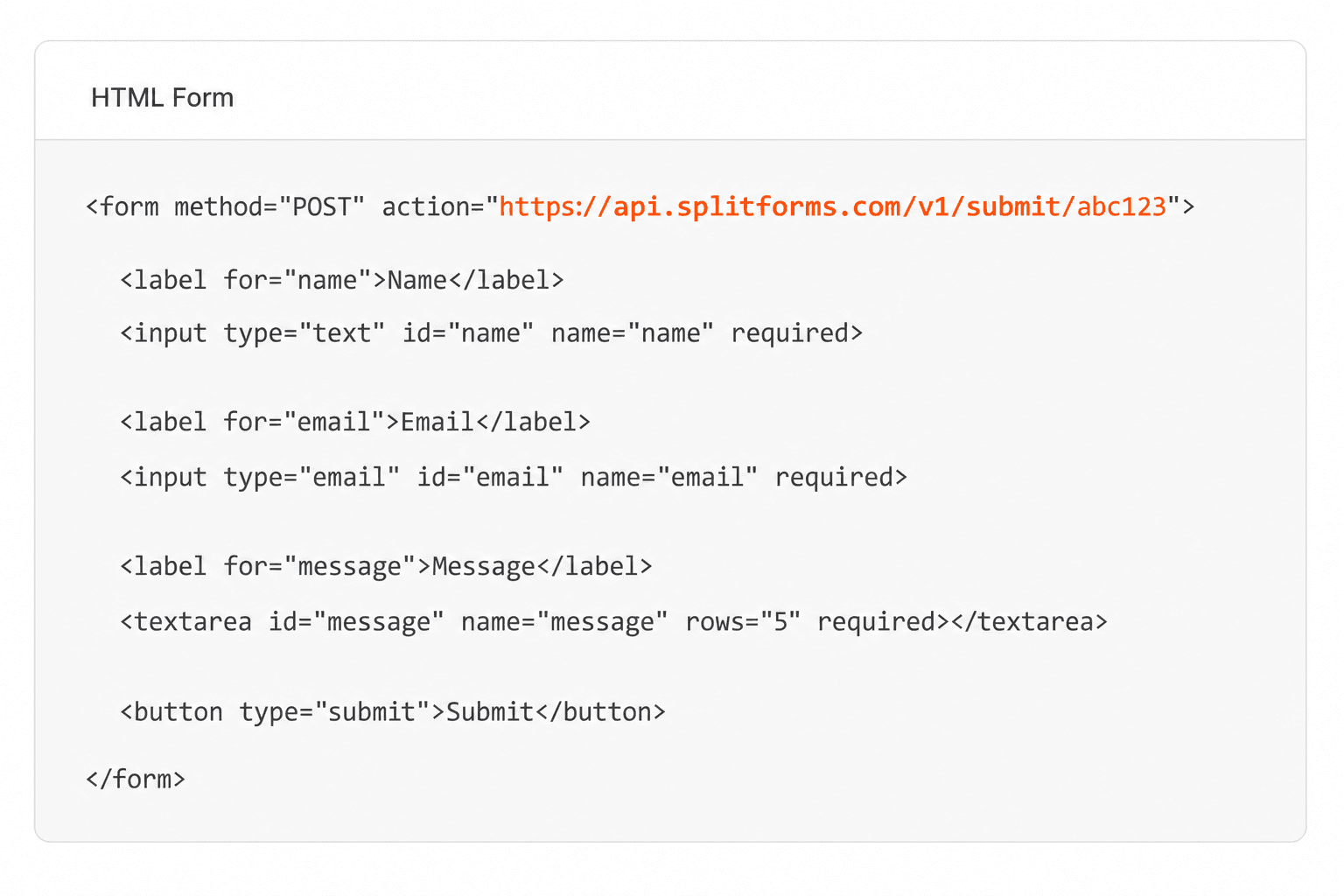
Point your form to your unique SplitForms endpoint. That's it.

HTML form pointing at a SplitForms submit endpoint

Receive submissions

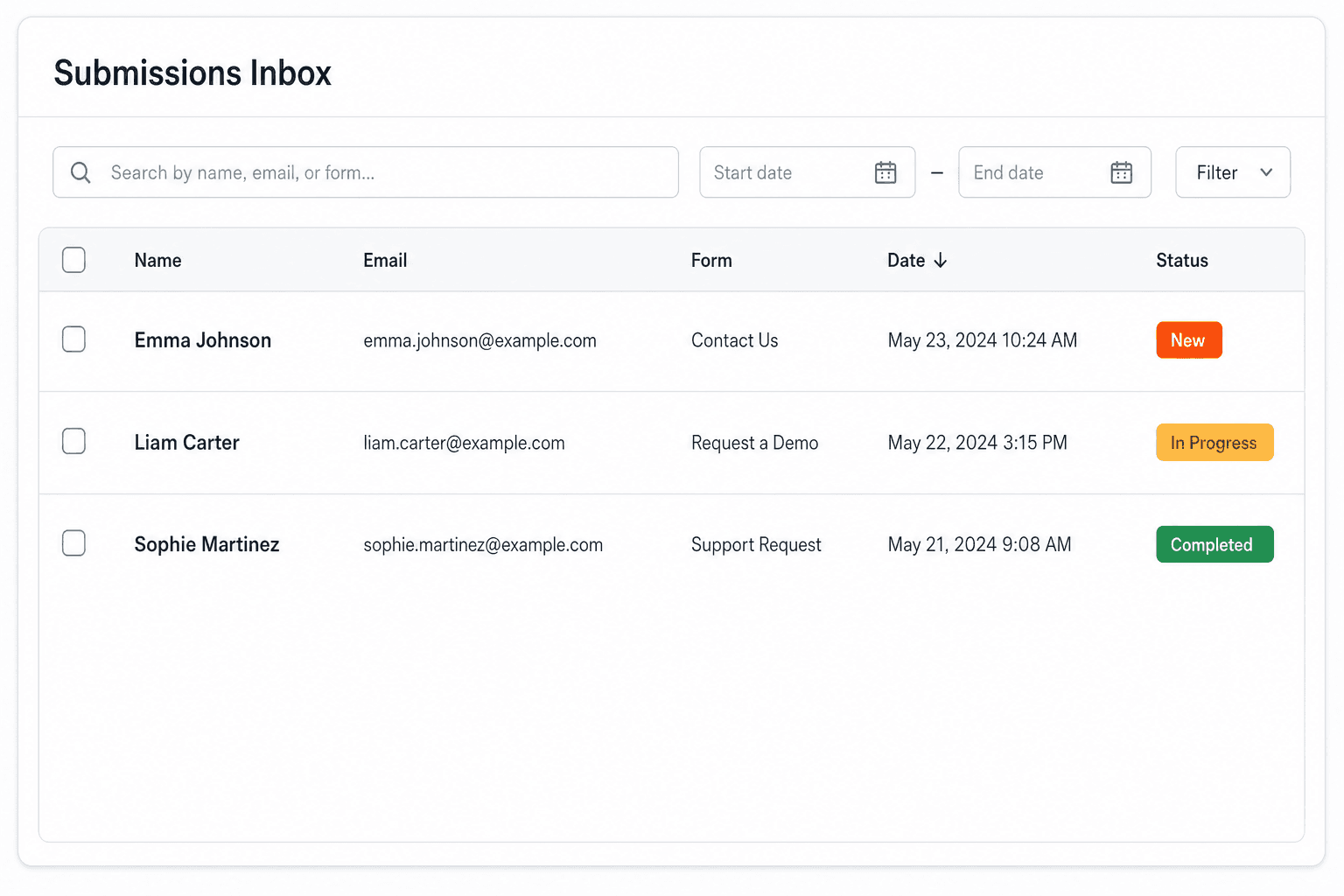
We instantly capture and organize every submission in your inbox.

Submissions inbox with searchable leads and status pills

Route anywhere

Send data to email, spreadsheets, CRMs, webhooks, and 7,000+ apps.

Generic integration tiles for email, sheets, chat, CRM, automate, and webhook

No credit card required. Set up in under 60 seconds.

Connect & automate

Where can submissions go besides email?

On paid plans, submissions can also go to Slack, Discord, Google Sheets, Notion, Airtable, Zapier or any signed webhook — and splitforms works on the platforms you build on, from WordPress and Shopify to Next.js. With Stripe connected, your forms can take payments too.

Connect your SplitForms form to Slack, Google Sheets, Mailchimp, Zapier and more
NewTake payments on your formsDeposits, bookings, order forms — submitters check out through Stripe and the money goes straight to your Stripe account. Included on every paid plan.See payment forms →Need time slots? Online booking →

Setup guides for the stacks you use

Questions

HTML min and max attributes questions, answered.

View all FAQs
What is the difference between min/max and minlength/maxlength?

min and max limit the value of number, range, date and time inputs, like 1 to 10 guests. minlength and maxlength limit how many characters a text input or textarea holds. Each pair is ignored on the other kind of input.

How do I set the min of a date input to today?

HTML has no "today" keyword, so set it with JavaScript: build today's local date as yyyy-mm-dd and assign it to the input's min property, for example input.min = today. Avoid new Date().toISOString().slice(0, 10), because it uses UTC and can be a day off.

Why does my number input accept a value above max?

The browser doesn't stop typing, it only blocks the submit. If the form has novalidate, the button has formnovalidate, or your script sends the form with form.submit() or fetch, the check never runs. Call form.reportValidity() first, and check the range on the server.

Can max be smaller than min?

Only on time inputs, where it means a range that crosses midnight, like 22:00 to 02:00. On number, date and the other types, no value can pass, so every non-empty value is flagged.

How do I show a custom error when a value is out of range?

Listen for the field's input event. When field.validity.rangeOverflow is true, call field.setCustomValidity("Please choose 10 guests or fewer."), do the same for rangeUnderflow, and call setCustomValidity("") once the value is valid again so the form can submit.

Simple pricing

How much does splitforms cost?

Free gives you 500 submissions for $0 — no card, no time limit. Pro is $5/month for 5,000 submissions a month, and Annual is $49/year for 15,000 a month with every Pro feature.

Free

$0— 500 submissions
 

No card, no time limit

Best for testing

For side projects and indie devs.

  • 500 free submissions
  • Unlimited forms
  • Email notifications included
  • Smart spam filtering
  • Submissions dashboard
  • Redirect after submit
  • MCP server included

Annual

$49/ year
About $4.08 per month, billed yearly
Best value

Every Pro feature with triple the volume — $0.27 per 1,000 at full use.

  • 15,000 submissions per month
  • Unlimited forms
  • Everything in Pro
  • File uploads with 5 GB storage
  • 3 team seats
  • Priority email support

No credit card required on Free • Cancel anytime • Full pricing and FAQ