
Free form backend for static sites and frontend apps.
A free form backend is a hosted endpoint that receives your website's form submissions so you don't have to write server code. splitforms is a free form backend: point any HTML form's action — or a fetch/JSON call — at https://splitforms.com/api/submit with your access key, and every submission is spam-filtered, stored in your dashboard, and emailed to you. Free covers 500 submissions a month with no credit card required.
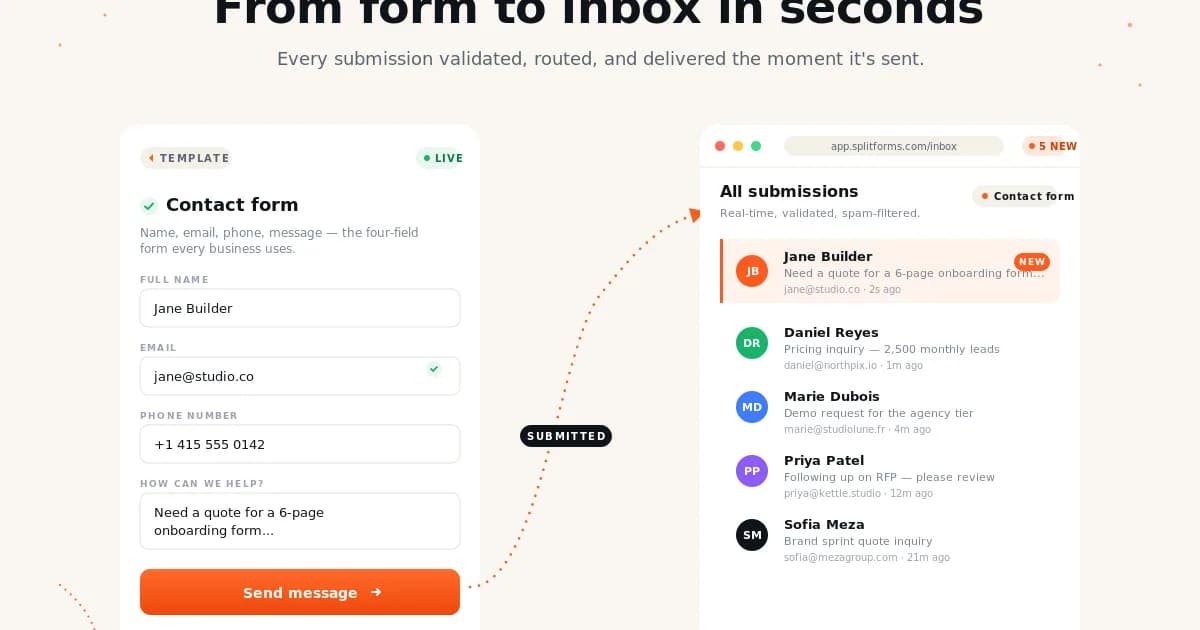
One endpoint is the whole backend.
The browser submits the form. splitforms validates, filters, stores, emails, and forwards the payload. Your site stays static.
<form action="https://splitforms.com/api/submit" method="POST">
  <input type="hidden" name="access_key" value="YOUR_ACCESS_KEY" />
  <input name="email" type="email" required />
  <textarea name="message" required></textarea>
  <input type="checkbox" name="botcheck" style="display:none" tabindex="-1" />
  <button type="submit">Send</button>
</form>Works with HTML, React, Next.js, and static site generators.
How to add a free form backend to your website
Same six steps whether you paste this into raw HTML, a React component, or a Next.js route — see the HTML example for the full markup.
Create a free access key
Sign up at splitforms — no credit card required. Every form gets its own access_key on the embed tab, and Free includes unlimited forms.
Point your form at the endpoint
Set action to https://splitforms.com/api/submit and method to POST for plain HTML, or POST the same fields as JSON with fetch() from React, Next.js, or Vue.
Add the spam-protection fields
Include the botcheck honeypot input, left empty, and a form_loaded_at hidden field set to Date.now() on page load. Both run on the Free plan alongside server-side content checks and IP rate limiting.
Set a redirect or reply-to (optional)
Add a redirect field to send visitors to a thank-you page after submit, or a replyto field so email replies go straight to the sender's address.
Submit a test entry
Send one test submission and confirm it lands in your dashboard and your inbox — owner email notifications are included free on every plan.
Scale up when you outgrow Free (optional)
500 submissions/month and unlimited forms are free forever. Starter ($1/mo) adds CSV/XML/PDF export, webhooks, and integrations once you need them.
fetch("https://splitforms.com/api/submit", {
  method: "POST",
  headers: { "Content-Type": "application/json" },
  body: JSON.stringify({
    access_key: "YOUR_ACCESS_KEY",
    email,
    message,
    botcheck: "",
    form_loaded_at: loadedAt,
  }),
});
Step 6 is optional — Free stays free forever. Need delivery beyond email first? See the webhooks docs or compare plans.
Free form backend FAQ
What is a form backend?
A form backend is the server-side receiver for a website form. It accepts the POST request, validates the fields, filters spam, stores the submission, and can route paid-plan submissions to email, webhooks, or integrations.
Is splitforms free to use?
Yes. The Free plan includes 500 submissions per month, unlimited forms, owner email notifications, dashboard storage, REST reads, and spam filtering — no credit card required. Starter ($1/mo) adds CSV/XML/PDF export, webhooks, integrations, and an auto-responder; Pro ($5/mo) adds CC/BCC and priority support.
Does this work with static sites?
Yes. splitforms works with plain HTML, GitHub Pages, Astro, Hugo, Eleventy, Jekyll, Next.js, React, Vue, Svelte, Webflow, Carrd, Framer, and WordPress because the integration is just a standard form action URL.
Do I need my own server or backend code?
No. Point your form's action — or a fetch() call — at https://splitforms.com/api/submit with a hidden access_key field and splitforms handles validation, spam filtering, storage, and email. There's no PHP script, SMTP credentials, or serverless function to write or host.
How does the free plan stop spam?
Every plan, including Free, includes a botcheck honeypot field, a form_loaded_at time-trap that rejects instant bot submissions, server-side content heuristics, and IP rate limiting (6 submissions/minute, 20 per 15 minutes). You can also restrict a form to specific domains or add your own reCAPTCHA v2 key.
Can I POST JSON instead of a plain HTML form?
Yes. The same endpoint accepts a standard HTML form action, a fetch() call with a JSON body, or multipart/form-data for file uploads — same access_key field, same response, so React and Next.js apps can submit without a hidden HTML form.
What happens if I need more than 500 submissions a month?
Upgrade when you outgrow Free: Starter is $1/month for 1,000 submissions with webhooks and integrations, Pro is $5/month for 5,000 with CC/BCC and priority support, and the 3-Year plan is a $59 one-time payment for 15,000/month. Business (unlimited) is available by emailing hello@splitforms.com.
How is this different from Formspree, Web3Forms, or Netlify Forms?
splitforms includes a larger free tier than most alternatives — 500 submissions/month with unlimited forms, email notifications, dashboard storage, and spam filtering on Free. Paid plans start at $1/month for 1,000 submissions with webhooks and integrations, and $5/month for 5,000 submissions with CC/BCC and priority support.
Want the request/response shapes for reading submissions back out? See the API reference. For spam filtering in more detail, read the complete spam protection guide.
Get a free form backend.
500 submissions per month, no credit card required.