
Point any HTML form at one endpoint. 500 free submissions — no card, no time limit — and unlimited forms.
Create free accountWhy direct-to-API spam happens
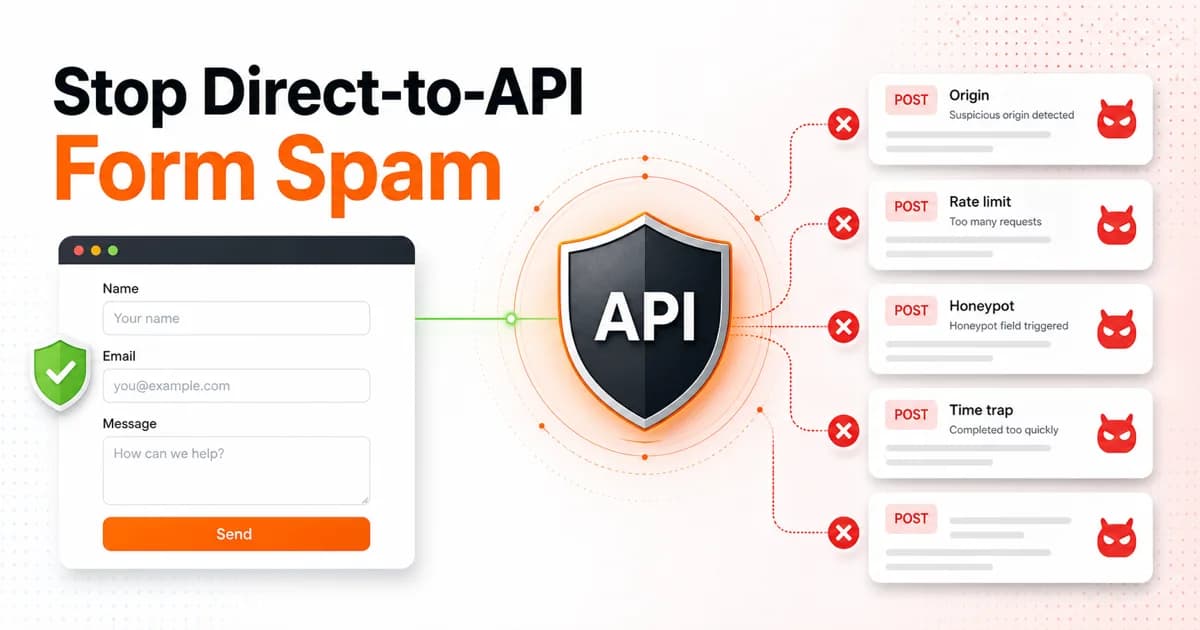
Browser-side protection only works if the attacker loads the browser. Many form bots do not. They scrape your HTML once, extract the endpoint and access key, then send raw POST requests from scripts. That bypasses frontend reCAPTCHA widgets, JavaScript timers, and any hidden fields that are only checked in client code.
For a form backend, the submission endpoint is the security boundary. The endpoint must read the current form settings and decide whether the submission deserves delivery.
The server-side gate order
- Method and content type. Accept POST with JSON, urlencoded, or multipart only.
- IP rate limit. Start with 5 submissions per 60 seconds per IP.
- Origin allow-list. If domains are configured, require Origin or Referer to match the root domain or subdomain.
- Honeypot validation. Check a fixed set of trap names on the server — splitforms uses
botcheck,_gotcha,hp,honey,trap,do_not_fill, andleave-blank. Avoid real-sounding names likewebsiteorconfirm_emailin this list — genuine forms collect those too, so treating them as a trap on a shared backend silently drops real submissions. - Time trap. Reject submissions sent too quickly after page load or absurdly late.
- Optional CAPTCHA verification. If a secret key exists, verify the token server-side with a timeout.
That is the exact shape we use in splitforms spam protection. Cheap checks run first, expensive network calls run last, and the delivery system only receives submissions that pass every enabled gate.
Origin checks are opt-in for a reason
An origin allow-list is powerful, but it needs to be settings-driven. If a user has not configured allowed domains, do not block the form. Once they add example.com, enforcement should begin on the very next request.
The matching rule should be exact host or subdomain only. www.example.com should match example.com, but example.com.evil.test must not.
Why silent drops beat error messages
Returning 403, 429, or “honeypot failed” teaches the attacker which part to change. For spam gates, a benign200 { success: true } response is safer. The bot thinks the payload worked and keeps sending the same junk, while the backend simply does not deliver it.
What this means for WordPress forms
WordPress sites are frequent targets because bots know the common plugin endpoints. If you use a hosted form backend, lock the form to your domain, keep the honeypot enabled, and verify the direct download plugin or shortcode still includes a form_loaded_at field. See the WordPress setup page.
How to detect direct-to-API spam
Before you can stop direct-to-API spam, you need to know what it looks like in your logs. Legitimate users load your page, interact with JavaScript, and submit through a rendered form. Bots skip all of that.
Watch for these request fingerprints in your submission logs:
- No Origin or Referer header. A browser always sends one or both. A scripted POST request often sends neither.
- User-Agent is curl, wget, python-requests, or blank. Real visitors have a full browser UA string. Raw HTTP clients expose themselves immediately.
- Submission arrives in under 1 second of page render. A human cannot fill a form that fast. If the time between page load and submission is less than 3 seconds, it is almost always a bot.
- Same payload across different form IDs. If the same email, name, and message body arrive at five different form endpoints, a scraper extracted the access keys and is replaying payloads.
- Payload contains SEO spam links. URLs to pharmaceutical, gambling, or adult sites embedded in the message body are a clear fingerprint of link-spam bots.
- Multipart boundary is missing or malformed. Bots that construct raw POST bodies sometimes mess up the encoding format, producing payloads that a browser would never generate.
The key signal is the combination. A missing Origin is suspicious on its own, but combined with a 0.2-second submission time and a known bot User-Agent, it is conclusive. That is why the gate order matters: check the cheap signals first, then escalate.
Code example: rate limiting middleware
A per-IP rate limit is the single most effective gate against direct-to-API spam. Here is a minimal Node.js implementation using an in-memory map that works for a single server or serverless function warm instance:
const ipCounts = new Map<string, { count: number; resetAt: number }>();

function rateLimit(ip: string, maxRequests = 5, windowMs = 60_000): boolean {
  const now = Date.now();
  const entry = ipCounts.get(ip);

  if (!entry || now > entry.resetAt) {
    ipCounts.set(ip, { count: 1, resetAt: now + windowMs });
    return false; // allowed
  }

  entry.count++;
  return entry.count > maxRequests; // true = blocked
}

// usage in your submit handler
app.post("/api/submit", (req, res) => {
  const ip = req.headers["x-forwarded-for"] || req.socket.remoteAddress;
  if (rateLimit(ip)) {
    return res.json({ success: true }); // silent drop
  }
  // continue processing...
});
For multi-region or serverless deployments, swap the Map for a Redis counter using the INCR + EXPIRE pattern, or use Upstash Redis which works natively at the edge. The rateLimit function returns false for allowed requests and true for blocked ones, so the caller decides whether to silently drop or return an error.
Which protection stops which bot type
No single gate blocks every bot. The table below maps common bot categories to the server-side checks that stop them:
| Bot type | Rate limit | Origin check | Honeypot | Time trap | CAPTCHA |
|---|---|---|---|---|---|
| Scraped-access-key spam | Yes | Yes | No | Partial | Yes |
| Generic SEO link spam | Yes | No | Yes | No | Partial |
| Low-volume human spammer | No | No | Partial | No | Yes |
| Credential-stuffing bot | Yes | Partial | No | Partial | Yes |
| AI-generated content spam | No | No | Partial | No | Yes |
The takeaway: rate limiting and honeypot together catch the majority of automated spam. CAPTCHA is the only reliable gate against low-volume human spammers and AI content, but it comes at a conversion cost. Honeypot vs reCAPTCHA covers the trade-off in detail.
FAQ
Why do bots POST directly to form APIs?
Because it is cheaper than loading a browser. Once a bot sees an endpoint and access key, it can replay POST requests without loading your page, JavaScript, honeypot script, or CAPTCHA widget.
Does a frontend honeypot stop direct-to-API spam?
Not by itself. The server must validate the honeypot field and drop submissions where it is filled. Anything that only runs in the browser can be bypassed by scripted POST requests.
Should failed spam checks return an error?
Usually no. For spam gates, a silent HTTP 200 response with a fake success body is better because it does not teach bots which check failed.
What is the strongest direct-to-API protection?
Use layered server-side checks: content type, IP rate limit, origin allow-list, honeypot validation, time trap, and optional server-verified CAPTCHA. No single gate is enough.
Want a ready-made implementation of all of this? Get a free access key — splitforms applies every gate on every submission by default. See also: how to stop contact form spam and AI form spam detection benchmarks.