
Point any HTML form at one endpoint. 500 free submissions — no card, no time limit — and unlimited forms.
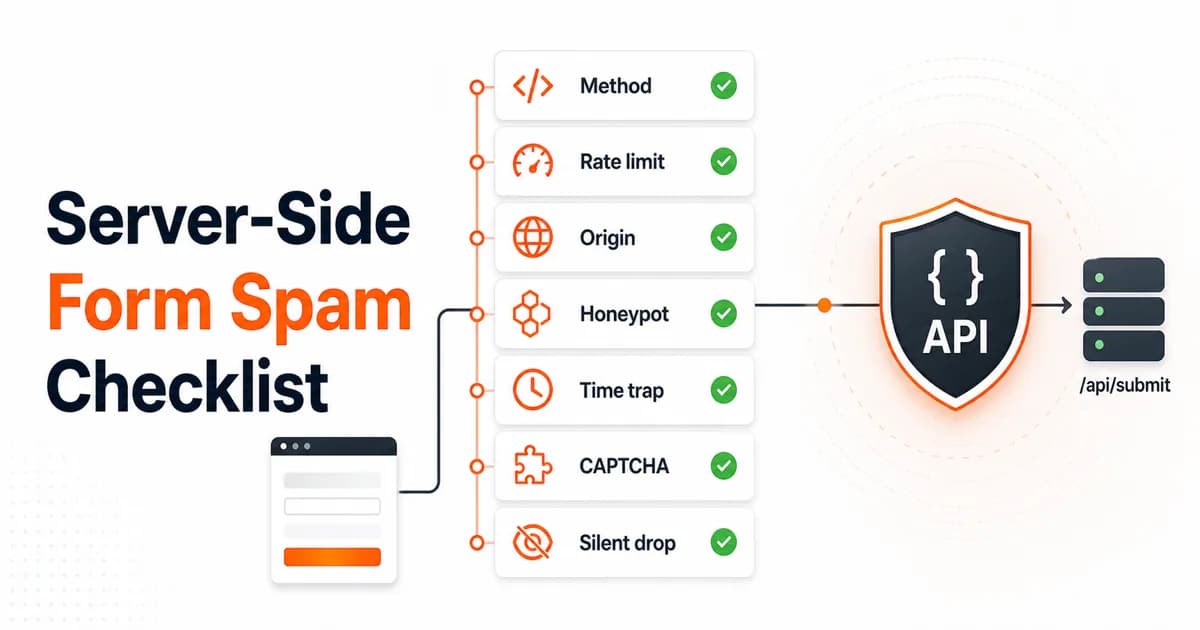
Create free accountThe checklist
Reject unsupported methods and content types
Cheaply drops scanners before parsing body data.
Apply per-IP rate limits
Stops repeated scripted POSTs and gives you an abuse signal.
Enforce allowed domains when configured
Prevents copied access keys from being replayed on unrelated sites.
Validate honeypot fields server-side
Keeps the field useful even when bots bypass JavaScript.
Check form_loaded_at
Blocks impossible instant submits and stale replay attempts.
Verify CAPTCHA tokens only when enabled
Keeps normal forms frictionless and protected forms stricter.
Silently drop failures
Keeps bot feedback loops unhelpful.
Log enough to debug
Record gate name and request metadata without storing sensitive payloads forever.
Implementation notes
The order matters. Run the cheapest checks before parsing large multipart bodies or calling third-party CAPTCHA APIs. Rate limiting should happen early. CAPTCHA verification should happen late and only for forms that have a secret key configured.
Settings should be read live per request. If a customer adds example.com to allowed domains, enforcement should start immediately. If they turn honeypot off, the honeypot gate should skip immediately. Cached settings are fine only with a short TTL and save-time invalidation.
Rate-limit storage
A single-instance app can use an in-memory Map for a first pass. The moment you move to multiple regions, serverless, or horizontal scaling, move that counter to Redis. Upstash Redis is a common fit because each edge/serverless worker sees the same counter.
How this maps to splitforms
splitforms applies these checks on /api/submit before delivery. The form dashboard controls honeypot and allowed domain settings, while optional reCAPTCHA remains opt-in. You can test a normal form on the form action tester or read the full comparison in direct-to-API spam protection.
Get a free access key and every one of these checks runs on your submissions by default.
Implementation priority: effort vs impact
Not all checks are equal. Some take five minutes and block most bots; others require infrastructure but catch only edge cases. Here is the checklist ranked by return on implementation effort:
| Priority | Check | Effort | Impact | Blocks |
|---|---|---|---|---|
| 1 | Reject bad methods/content types | 5 min | High | Scanners, misconfigured integrations |
| 2 | Server-side honeypot | 10 min | Very high | Most automated bots |
| 3 | Per-IP rate limit | 20 min | High | Repeated scripted POSTs |
| 4 | Time trap (form_loaded_at) | 15 min | High | Instant-submit bots, replays |
| 5 | Origin allow-list | 30 min | Medium | Copied access keys on other sites |
| 6 | CAPTCHA verification | 60 min | Medium | Low-volume human spam, AI content |
| 7 | Silent drops | 5 min | Prevents adaptation | All (by not teaching bots) |
| 8 | Structured logging | 30 min | Enables debugging | All (via analysis) |
If you have limited time, implement the top three checks. They take under an hour combined and block most automated form spam. The remaining checks incrementally tighten coverage.
Code: implementing the top 3 checks
Here is a concrete Node.js implementation of the three highest-priority checks: content-type validation, honeypot, and rate limiting. This pattern works in Express, Fastify, or any framework that gives you access to request headers and body.
// --- Check 1: Method and content-type ---
function validateMethod(req: Request): boolean {
  return req.method === "POST";
}

function validateContentType(req: Request): boolean {
  const ct = req.headers["content-type"] || "";
  return (
    ct.includes("application/x-www-form-urlencoded") ||
    ct.includes("multipart/form-data") ||
    ct.includes("application/json")
  );
}

// --- Check 2: Server-side honeypot ---
function isHoneypotFilled(body: Record<string, unknown>): boolean {
  const traps = ["botcheck", "website", "confirm_email"];
  return traps.some((field) => body[field]);
}

// --- Check 3: Per-IP rate limit (in-memory) ---
const ipMap = new Map<string, { count: number; resetAt: number }>();

function isRateLimited(ip: string, max = 5, windowMs = 60_000): boolean {
  const now = Date.now();
  const entry = ipMap.get(ip);
  if (!entry || now > entry.resetAt) {
    ipMap.set(ip, { count: 1, resetAt: now + windowMs });
    return false;
  }
  return ++entry.count > max;
}

// --- Wire them together ---
app.post("/api/submit", async (req, res) => {
  const ip = req.headers["x-forwarded-for"] || req.socket.remoteAddress;

  if (!validateMethod(req) || !validateContentType(req)) {
    return res.json({ success: true }); // silent drop
  }

  if (isRateLimited(ip)) {
    return res.json({ success: true }); // silent drop
  }

  const body = await parseBody(req);

  if (isHoneypotFilled(body)) {
    return res.json({ success: true }); // silent drop
  }

  // passed all gates — process the submission
  await deliverSubmission(body);
  return res.json({ success: true });
});
Three notes on this implementation. First, every gate returns a benign 200 response instead of an error code — this is the silent drop principle explained in the direct-to-API spam article. Second, the Map works for single instances but must be swapped to Redis for multi-region or serverless deployments. Third, the honeypot field names should match whatever your frontend form renders — the trap only works if the server checks the same field names.
Monitoring and alerts
Spam protection is not a set-and-forget system. Bot patterns evolve, new campaigns launch, and volume spikes can indicate anything from a scraped access key to a coordinated attack. You need visibility into what your filters are catching.
Track these metrics from day one:
- Total submissions per form per day. A sudden 10x spike without a traffic increase means a bot found you.
- Spam vs ham ratio. If more than 30% of submissions are being silently dropped, your form is being actively targeted and you should consider tightening gates.
- Gate-specific rejection counts. Knowing which gate catches the most spam tells you where to invest effort. If the honeypot catches nearly all of your junk, a CAPTCHA is probably not worth the friction.
- IPs hitting rate limits. A single IP hitting limits on 20 different forms is a scanner, not a frustrated user.
- Origin block rate. Rising origin rejections suggest your access key was copied to another site.
For alerting, set a threshold on the spam-to-ham ratio. If it exceeds 50% for more than an hour, send a Slack or email notification so a human can investigate. With splitforms, the dashboard shows each form's submissions with flagged ones in a separate Spam folder, so you do not have to build your own monitoring pipeline.
FAQ
What checks should run server-side on a contact form?
At minimum: method/content-type validation, rate limiting, server-validated honeypot, time-to-submit check, and optional CAPTCHA token verification. If the form owner configured allowed domains, enforce Origin or Referer too.
Should form spam protection use Redis?
Use Redis or another shared store if the app runs across multiple server instances or serverless regions. An in-memory map is fine only for a single long-lived instance.
What should happen on a spam rejection?
Return a benign 200 success response and do not deliver the submission. Silent drops avoid teaching bots how to adapt.