
A reCAPTCHA alternative for contact forms that stops spam without puzzles.
A reCAPTCHA alternative replaces Google's script and puzzle with checks that run after the browser submits — nothing for visitors to see or solve. splitforms does this by pointing your existing form at one endpoint, https://splitforms.com/api/submit, and filtering every request server-side with a honeypot field, a time-trap, rate limits, and content heuristics. No third-party script, no tracking cookie, no conversion tax.
500 submissions/month free · honeypot + time-trap included on every plan.
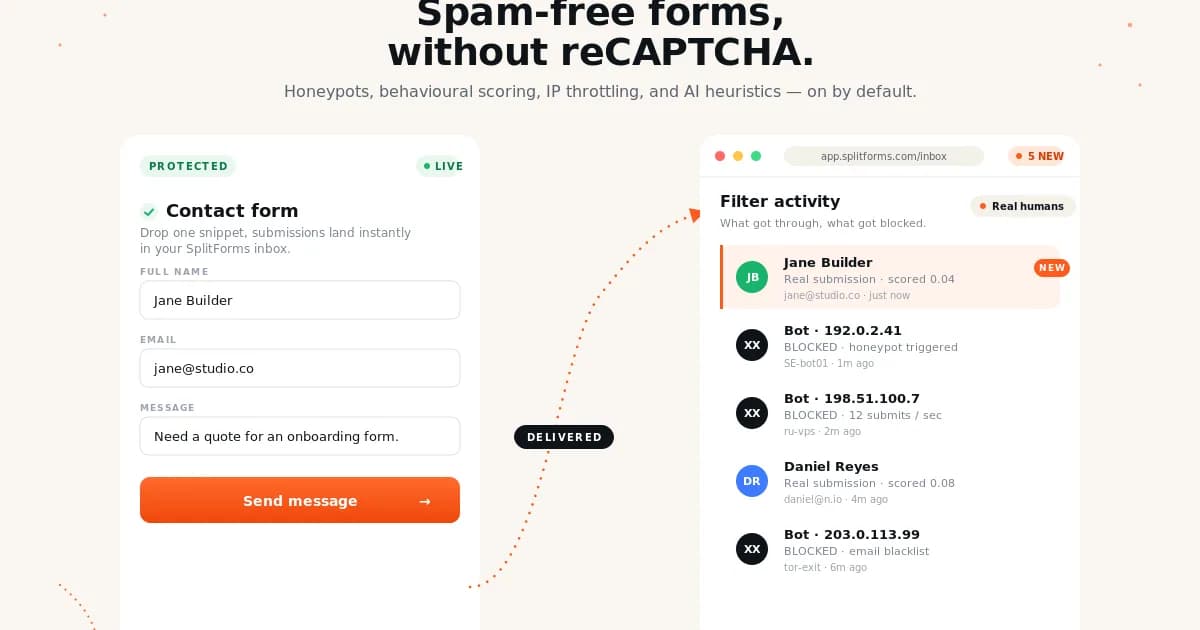
Replace visible CAPTCHA with invisible spam layers.
The honeypot and time-trap fields catch naive bots on their own. splitforms handles the harder parts server-side: allowed-domain checks, rate limits, and message scoring.
<form action="https://splitforms.com/api/submit" method="POST">
  <input type="hidden" name="access_key" value="YOUR_ACCESS_KEY" />
  <input type="hidden" name="form_loaded_at" id="form_loaded_at" />

  <input name="email" type="email" required />
  <textarea name="message" required></textarea>

  <!-- reCAPTCHA alternative: hidden honeypot -->
  <input
    type="checkbox"
    name="botcheck"
    autocomplete="off"
    tabindex="-1"
    aria-hidden="true"
    style="position:absolute;left:-9999px"
  />

  <button type="submit">Send</button>
</form>

<script>
  document.getElementById('form_loaded_at').value = Date.now();
</script>reCAPTCHA vs the splitforms spam stack.
reCAPTCHA v2 and v3 both load a Google script before anyone can submit. The splitforms stack runs the equivalent checks after the POST, so nothing loads on the way in.
reCAPTCHA v2
A checkbox that sometimes expands into an image puzzle. Loads a Google script and cookie for every visitor, human or not.
reCAPTCHA v3
Skips the puzzle for most people, but still loads Google's script in the background, scores every page view, and still challenges some real visitors.
Honeypot + time-trap
A hidden botcheck field only a bot fills in, plus a form_loaded_at timestamp that flags submissions sent back too fast to be typed. Invisible to real visitors.
Rate limiting
Caps abuse at 6 submissions per minute per IP, with a sustained cap of 20 per 15 minutes — automated bursts get an HTTP 429, regardless of what the message says.
Server-side content heuristics
Scores the message body itself after it arrives, layered on top of the honeypot and time-trap rather than replacing them.
Allowed-domain checks
Each form can be locked to the domains it's meant to be embedded on, with an optional strict-origin mode for tighter control.
How to replace reCAPTCHA on a contact form in 5 steps.
- 01
Remove the reCAPTCHA script and site key
Delete the Google reCAPTCHA script tag and the g-recaptcha-response widget from your markup. There's nothing to load in its place.
- 02
Add the honeypot field
Add a hidden botcheck field to the form, visually hidden and marked aria-hidden. Real visitors never see or fill it; a bot that auto-fills every input gives itself away.
- 03
Add the time-trap field
Add a hidden form_loaded_at field and set it to the current timestamp with a one-line script when the page loads. Submissions sent back within a couple of seconds are treated as automated.
- 04
Point the form at the splitforms endpoint
Set action to https://splitforms.com/api/submit with method="POST" and your access_key as a hidden field. That endpoint enforces allowed-domain checks, a 6-per-minute-per-IP rate limit, and server-side content heuristics on every request.
- 05
Add reCAPTCHA v2 only if you still need it
If a specific form keeps attracting human-driven abuse after the layers above, turn on the optional reCAPTCHA v2 add-on with your own site key. Most forms never need it.
This works the same regardless of what renders the form — React, WordPress, or plain HTML all POST to the same endpoint and hit the same spam checks.
More ways to keep spam out without reCAPTCHA.
Form spam guide
Full defense-in-depth playbook for contact form spam.
Spam score tester
Test sample submissions against spam signals.
Honeypot generator
Generate accessible hidden fields for any form.
Honeypot vs reCAPTCHA
Side-by-side tradeoffs for conversion and protection.
10 reCAPTCHA alternatives tested
A roundup of the alternatives we tried, honeypot included.
reCAPTCHA alternative questions.
What is the best reCAPTCHA alternative for contact forms?
For most contact forms, the best alternative is a layered server-side filter: a honeypot field, a time-trap, IP rate limits, and content heuristics. This avoids Google scripts, puzzle friction, and the accessibility issues visible CAPTCHAs cause.
Can I stop form spam without CAPTCHA?
Yes. Most form spam is automated and can be blocked with a honeypot field, a time-trap, and rate limits. Add the optional reCAPTCHA v2 layer only if you have evidence of human-driven abuse those simpler layers don't catch.
Is a honeypot better than reCAPTCHA?
A honeypot is better for user experience because real visitors never see it, it catches simple bots, and it adds no page weight. Pair it with a time-trap and server-side content heuristics to catch what a honeypot alone misses, including messages written with AI tools.
Does splitforms load third-party anti-spam scripts?
No. The default splitforms spam stack runs server-side after submission. There is no Google reCAPTCHA script, no tracking badge, no puzzle, and no extra client-side dependency.
Does splitforms still support reCAPTCHA v2 if I need it?
Yes. reCAPTCHA v2 is available as an optional, per-form add-on — bring your own Google site key and secret. It sits on top of the honeypot, time-trap, and rate-limit layers rather than replacing them, so most forms never need to turn it on.
Does a reCAPTCHA alternative slow down my form or hurt conversions?
No. splitforms doesn't add a client-side script, cookie, or widget by default, so there's nothing extra to load before a visitor can submit. The honeypot field is invisible, and the time-trap, rate-limit, and content-heuristic checks all run after the POST — the form stays as fast as plain HTML.
Is there a submission limit on the free plan?
Free covers 500 submissions a month across unlimited forms, with email notifications included. Starter ($1/mo) raises that to 1,000 and adds exports, webhooks, and auto-responders; Pro ($5/mo) covers 5,000 with CC/BCC and priority support; a one-time $59 3-Year plan covers 15,000/month. Business plans are unlimited — contact hello@splitforms.com.